This article explains how Zero Trust Network Access (ZTNA) reduces the attack surface created by traditional VPN-based remote access. Unlike VPNs, which grant users broad network access after authentication, ZTNA provides access only to the specific applications users are authorized to use while continuously verifying identity, device health, and contextual risk.
Executive Summary
Traditional VPNs increase organizational risk by granting network-level access that enables lateral movement once credentials are compromised. Zero Trust Network Access (ZTNA) replaces this model with application-specific, identity-aware access that continuously evaluates user identity, device health, and contextual risk before authorizing each request. This article explains the architectural differences between VPNs and ZTNA, demonstrates a practical implementation using a self-hosted example, compares deployment models, outlines migration strategies, operational best practices and highlights common implementation mistakes. Organizations adopting ZTNA can substantially reduce their attack surface, eliminate unnecessary network exposure, and enforce least-privilege access without sacrificing remote user productivity.
Background
Most organizations running VPN-based remote access share a structural problem that has nothing to do with their VPN product. once a user connects, they land inside the network with far more access than they actually need. A VPN tunnel drops a user onto a network segment. From there, they can often reach adjacent systems HR platforms, internal APIs, database servers and dev environments, that have nothing to do with their job. That excess access is not a configuration error. It is a natural consequence of granting network-level access when what you needed to grant was application-level access.
This architecture creates real risk. The 2021 Pulse Secure VPN compromise, the Colonial Pipeline breach, and a long list of others followed the same pattern, an attacker obtained valid VPN credentials, connected through a legitimate gateway, and moved laterally before anyone noticed. The problem was not weak passwords. The problem was that once inside, there was nowhere useful the attack could be contained.
Zero Trust Network Access (ZTNA) addresses this at the architectural level. It does not tune your VPN, it replaces the model. Instead of granting network access and trusting downstream controls to limit what users reach, ZTNA grants access to a specific application only after verifying identity, device health, and context at the time of each request. The internal network stays invisible to the outside world.
Real World Incidents Driving ZTNA Adoption
Colonial Pipeline — Compromised VPN Credentials (2021)
Attackers obtained credentials for a legacy, unused VPN account (found in a breached password database) that had no MFA enabled. Because the VPN granted network-level access, they moved laterally from the IT network toward operational technology systems, ultimately forcing the shutdown of 5,500 miles of fuel pipeline. The root cause wasn't a weak password alone it was that valid credentials translated directly into broad internal network access with no further verification. With ZTNA, that account would have had access scoped to specific applications only, and continuous posture checks would have flagged the anomalous session origin before any lateral movement occurred.
Pulse Secure Zero-Day Exploitation — CVE-2021-22893 (2021)
Nation-state threat actors exploited multiple zero-days in Pulse Connect Secure VPN appliances to gain unauthenticated remote code execution on the gateways themselves. Because these concentrators are internet-facing by design, they were reachable, scannable, and exploitable without any prior credential. Multiple U.S. government agencies and critical infrastructure operators were affected. This case directly illustrates the second risk in your document: the VPN concentrator itself is an exposed, high-value target. ZTNA eliminates this attack vector entirely, there is no internet-facing gateway to exploit, because the application connector establishes outbound-only connections.
Uber Data Breach — MFA Fatigue and Lateral Movement (2022)
An attacker social-engineered an Uber contractor via WhatsApp, bombarding them with MFA push notifications until the employee approved one to make the spam stop (MFA fatigue). Once authenticated, the attacker discovered a PowerShell script on an internal network share that contained hardcoded administrative credentials, which granted access to Uber's Thycotic PAM, AWS, G Suite, HackerOne, Slack, and other platforms. The single authenticated VPN session became a pivot point to virtually every internal system. ZTNA with per-application access policies, short session durations for sensitive applications, and continuous re-evaluation on risk signals would have contained the blast radius to only what the contractor's role explicitly permitted.
Why VPNs Create a Wide Attack Surface
A traditional VPN assigns a remote user an IP address inside your network perimeter. From the network's perspective, they look like a local machine. That is the design and that is the problem. Consider a contractor who needs access to one internal project management tool. With a VPN, they often land on the same subnet as your ERP, internal APIs, build servers, and file shares. None of that is intentional, it is a side effect of how network-layer tunnels work, and in most organizations it goes unaddressed because locking it down requires significant network ACL work for every new segment.
Three risks emerge from this model directly:
- Lateral movement after credential theft. When an attacker obtains a VPN username and password, they inherit the same broad access as the legitimate user. Tools like BloodHound, NetScan, and nmap make it straightforward to map reachable systems from any foothold inside a flat segment.
- Exposed attack surface on the VPN concentrator itself. VPN gateways are internet-facing by definition. They are subject to scanning, exploitation of known CVEs, and brute-force attacks. Fortinet, Pulse Secure, and Cisco have all had critical remote code execution vulnerabilities in their VPN appliances in recent years, often requiring emergency patching with limited maintenance windows.
- Implicit trust after authentication. Most VPN implementations do not re-evaluate access once a session is established. A connection that was legitimate at 9 AM stays trusted at 3 PM, even if the device was subsequently compromised, the user's credentials were revoked in the IdP, or behavioral anomalies were detected.
NIST
What ZTNA Actually Does Differently
ZTNA flips the access model. Instead of granting network access and trusting downstream controls, it grants access to a specific application only after validating multiple signals. Who the user is, what device they are on, and whether the request meets your policy at that moment. The user never sees the internal network. They connect through a control plane that proxies or tunnels their request to the application, but the internal infrastructure is dark to the outside world. There is no IP address to scan, no concentrator to exploit, no way to laterally move to something you were not explicitly granted access to. Three core principles from NIST SP 800-207 underpin this:
- Every request is treated as untrusted until it passes verification, regardless of where it originates.
- Access is granted per session, not per network connection.
- Policies are evaluated dynamically, based on identity and context, not network location.
Practically, this means a developer can reach the internal CI/CD dashboard without being able to access the production database, even if those two systems sit on the same internal subnet and the developer's account technically has permissions to both. The ZTNA layer enforces what they should reach, not just what they could reach.
A Concrete Example: SSH Access Without an Open Port
The easiest way to feel that distinction is to set one up and watch what does and does not end up reachable. Take the same developer from the CI/CD example above, now needing to SSH into a build server back at the office while working from a coffee shop. Under a VPN, that build server's SSH daemon has to sit on a network interface the VPN segment can route to, and once the developer's session lands on that segment, everything else on it becomes reachable too the same lateral movement problem covered earlier in this article.
In this example, I use zrok as a self-hosted ZTNA platform because it provides a simple, practical way to demonstrate how Zero Trust Network Access works and how it differs from a traditional VPN. Rather than focusing on enterprise features such as centralized policy management or device posture enforcement, this example highlights the core ZTNA principle: establishing outbound-only connections and granting access only to a specific identity and a specific resource. By stripping the architecture down to its essentials, it becomes easier to understand the underlying mechanism before exploring more feature-rich commercial ZTNA platforms. On the build server, a zrok client shares exactly one resource and nothing else:
$ zrok share private --backend-mode tcpTunnel 127.0.0.1:22
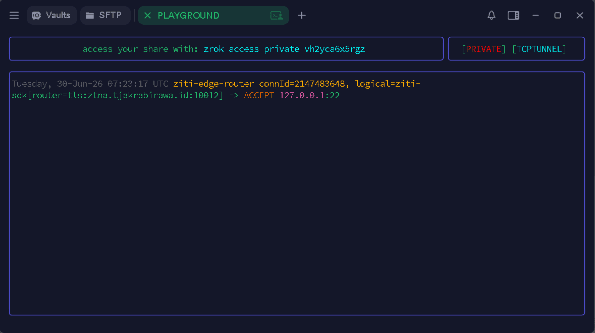
The private command means no public frontend gets created, there's no URL here for anyone to find by guessing or scanning. --backend-mode tcpTunnel forwards the raw TCP payload instead of acting as an HTTP reverse proxy, which is what makes a non-HTTP protocol like SSH work over the share at all (the CI/CD dashboard from the earlier example, being a web application, would use zrok's default proxy mode instead). And note the target 127.0.0.1:22. The build server's sshd in this setup only has to bind to loopback the zrok client running on that same host makes the connection locally and carries the traffic out itself. It never has to be reachable from anywhere else on the network, VPN segment or otherwise. On the laptop, the developer runs the access side with that token:
$ zrok access private vh2yca6x5rgz
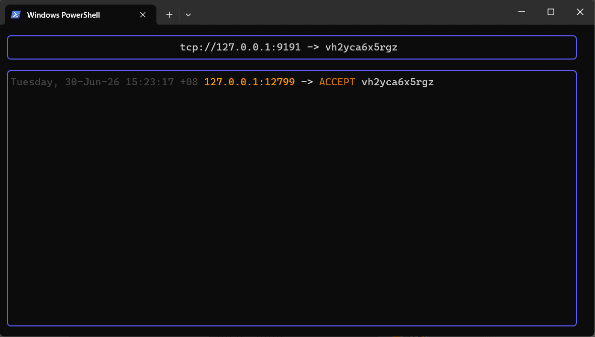
The following command starts a private zrok access session using the generated share token. Instead of exposing the remote service directly to the network, zrok creates a local TCP listener on the laptop's loopback interface ( 127.0.0.1 ) and securely forwards all traffic through the established ZTNA tunnel to the remote SSH service. In this example, the remote server becomes available locally at 127.0.0.1:9191 , meaning any application on the laptop can interact with it as though the service were running on the local machine. From the user's perspective, there is no special client configuration beyond connecting to the assigned local port. A standard SSH client can therefore establish a secure session by connecting to 127.0.0.1 on port 9191 , while zrok transparently handles authentication, encrypted transport, and forwarding over its outbound-only connection without requiring the server to expose an inbound SSH port or accept direct Internet connections:
$ ssh -p 9191 user@127.0.0.1
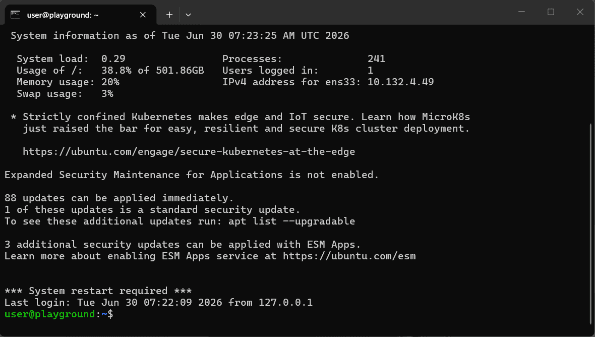
The short sequence above demonstrates the complete lifecycle of a ZTNA connection, from publishing a private service to accessing it through an authenticated identity. Although the example is intentionally simple, it illustrates several of the core principles that distinguish ZTNA from traditional VPN-based remote access. Instead of exposing a network endpoint and then protecting it with firewall rules or network segmentation, the service remains invisible to the public Internet while access is established only after successful authentication and authorization. The following observations highlight the key security and operational characteristics demonstrated by this workflow:
- Nothing accepted an inbound connection at any point. Not the build server, not the laptop, not anything sitting between them. Both sides dialed out to the OpenZiti overlay, which brokered the connection between the two authenticated zrok identities holding that share token. There was no listening socket anywhere for a port scan to find.
- The token by itself doesn't get anyone in. Accessing a private share requires an authenticated zrok identity on the same service instance the share was created on, not just knowledge of the token string. Someone who intercepts the token without that identity has nothing they can connect to.
- Revocation is one keystroke. Ctrl+C on the zrok share process pulls the resource off the overlay immediately, no firewall rule to roll back, no VPN session to terminate, no change ticket to file.
It's a minimal, single-resource version of the same architecture the rest of this article covers at platform scale, but running it once is a fast way to confirm that the "dark to the outside world" claim from the previous section is a literal description of the network, not marketing language.
The Authentication and Authorization Flow
At a high level, a ZTNA request follows a straightforward sequence. A user first authenticates with an external identity provider, after which a centralized policy engine evaluates whether access should be granted based on multiple signals rather than identity alone. If the request satisfies the defined policies, the control plane authorizes a secure connection through an application connector that already maintains an outbound connection from the private network. The application itself remains isolated from direct Internet access, and users are connected only to the specific resource they have been authorized to use. The simplified flow below illustrates this process.
User Device↓Identity Provider (IdP)↓ZTNA Control Plane|├──► Device Posture Check|├──► Context Evaluation|↓Application Connector↓Internal Application
Although the workflow appears straightforward from the user's perspective, it reflects several fundamental design principles that distinguish ZTNA from traditional remote-access architectures. Each stage of the connection is intentionally designed to minimize exposure, verify trust before granting access, and limit users to only the resources they are explicitly authorized to use. The most important characteristics demonstrated by this architecture are:
- The connector is outbound-only. The application connector, deployed inside your network, establishes an outbound connection to the ZTNA control plane. Your internal application never needs an inbound port open to the internet. An attacker scanning your public IP ranges finds nothing they can connect to, because there is nothing listening.
- Authentication is decoupled from authorization. A successful login to your IdP does not automatically grant access to an application. The ZTNA policy engine evaluates the identity claim from the IdP alongside additional signals, device posture and context, before issuing an access token scoped to a specific application. These are two separate steps, even if they happen within the same second from the user's perspective.
- Granularity is per-application. You can grant a contractor access to one specific internal tool without giving them any visibility into what else exists on the internal network. They cannot enumerate services, scan ports, or reach adjacent systems. What they cannot see, they cannot attack.
After following the request flow, several architectural characteristics become apparent. Unlike traditional VPNs, where authentication often results in broad network connectivity, ZTNA treats every application request as an independent authorization decision. The application connector eliminates the need to expose internal services through inbound firewall rules, while the policy engine continuously enforces access based on identity, device health, and contextual information. Together, these design principles reduce the attack surface, limit lateral movement, and ensure that users receive access only to the specific applications required for their work, rather than to the internal network as a whole.
Device Posture Verification
Most mature ZTNA platforms support device posture checks as part of the authorization decision. Before a request is proxied to the internal application, the system verifies that the device meets a set of criteria you define. Common checks include:
- Device certificate: Is this a corporate-managed device with a valid certificate issued by your MDM (Jamf, Intune, or similar)?
- OS version and patch level: Is the operating system current, or is it running a version with known unpatched CVEs?
- Disk encryption: Is storage encrypted (FileVault on macOS, BitLocker on Windows)?
- EDR agent status: Is your endpoint detection and response agent installed, running, and reporting healthy?
- Screen lock policy: Is auto-lock configured within your acceptable threshold?
The outcome is that a device that fails these checks cannot access sensitive applications, even with valid IdP credentials. This breaks the assumption that credential theft is sufficient for access.
Continuous Verification vs Static Trust
VPNs establish trust at connection time and leave it alone. A session connected at 9 AM with a healthy, compliant device remains trusted at 3 PM even if that device has since been flagged by your EDR, the user's account was suspended in the IdP, or anomalous lateral movement was detected by your SIEM. ZTNA platforms that implement continuous verification re-evaluate access either on a configurable time interval or in response to trigger events. NIST SP 800-207 describes this as a core characteristic of a mature zero trust implementation. In practice, continuous verification means:
- Sessions can be terminated mid-flight if a device posture check fails. If the EDR agent goes offline or the certificate expires, access stops.
- Access can be stepped up requiring re-authentication if a risk signal changes. High-risk IP, unusual access time, or a new device trigger an additional verification prompt.
- SIEM or identity threat detection alerts can feed back into the authorization engine to revoke access in real time, rather than waiting for a human to notice and act.
Not every tool implements this equally well. For teams that want out-of-the-box behavior, the commercial options have less friction. For teams that need deep customization and are willing to invest in the integration work.
Architecture Patterns
There are two primary deployment patterns for ZTNA, each with different trade-offs depending on your infrastructure and requirements. Some solutions also specialize in protocol-aware access for infrastructure management, including SSH, RDP, Kubernetes API servers, and databases. If your remote access requirements primarily involve engineers administering infrastructure rather than end users accessing web applications, this category of solution is worth considering. Features such as session recording, audit logging, and certificate-based authentication are particularly well suited to privileged infrastructure access.
Cloud-Brokered (Proxy Model)
User traffic flows through a cloud-hosted control plane before reaching your internal application. The control plane handles authentication, policy evaluation, and traffic proxying or tunneling.
[User] ──► [Cloud Control Plane] ──► [Connector in Your Network] ──► [App]
Deployment is fast, you install a lightweight connector inside your network, configure an application policy in the SaaS dashboard, and traffic flows through the vendor's infrastructure. The trade-off is that all traffic in transit passes through the vendor's cloud, which introduces a dependency and a question about data residency that matters to some organizations more than others.
Self-Hosted / Peer-to-Peer Overlay
You operate the control plane yourself, and traffic flows through a private overlay network. The vendor (or open source project) provides the software; you provide the infrastructure.
[User] ──► [Self-Hosted ZTNA Controller] ──► [Direct encrypted tunnel to App Server]
Several modern remote access solutions follow this architecture with varying implementation approaches. Many use a secure encrypted tunneling protocol for the data plane while adding centralized authentication, identity-aware access control, and policy management on top. Some platforms take a more comprehensive approach by building a complete overlay network where services are identified by cryptographic identities instead of IP addresses, allowing secure connectivity regardless of the underlying network topology.
Choosing Between the Two Models
The choice between a cloud-brokered and a self-hosted ZTNA deployment is not primarily a security decision, as both models can implement the same zero-trust principles of identity-based authentication, least-privilege access, and outbound-only connectivity. Instead, the decision is driven by operational priorities such as deployment effort, infrastructure ownership, compliance requirements, and the level of control an organization needs over its environment. The following comparison summarizes the key trade-offs between the two approaches.
| Factor | Cloud-Brokered | Self-Hosted |
|---|---|---|
| Deployment effort | Low | Medium to High |
| Data sovereignty | Vendor controls transit | You control all traffic |
| Operational overhead | Vendor manages infrastructure | You manage |
| Customization | Limited to vendor feature set | Medium to High |
| Cost model | Per-user SaaS licensing | Infrastructure + operational cost |
| Suitable scale | Most organizations | Large orgs or strict compliance requirements |
For most organizations under around 1,000 users with no hard data residency constraints, a cloudbrokered model makes operational sense. For organizations with strict regulatory requirements, specific data locality needs, or who need behavior the SaaS platforms cannot support, self-hosted options provide the flexibility at the cost of operational complexity.
Real World Migration Scenario
The situation is a professional services firm has 420 employees, approximately 300 of them working remotely full-time. They run a Cisco AnyConnect VPN terminating into a pair of ASA appliances at their primary data center. Around 90 contractors connect with separate VPN credentials but land on the same internal segment as employees.
The problems that prompted action
- Two contractors were found to have accessed financial reporting systems they had no legitimate reason to touch. The access was discovered during a routine audit, not by any automated control. Both contractors had been on the same internal subnet as the finance platform for over a year.
- A phishing campaign compromised a full-time employee's VPN credentials. The attacker maintained a persistent presence in the environment for 11 days before being detected through a SIEM alert on unusual data transfer volume. The initial access and lateral movement were not flagged by any network control.
- A critical remote code execution CVE was published for the ASA firmware version they were running. Patching required a maintenance window that caused a four-hour outage during business hours, since the ASA was a single choke point for all remote traffic.
- IT had no fast path to scoping down contractor access. Every change required network ACL modifications through a formal change management process that took one to two weeks.
The migration approach
- Application inventory first. Before touching any tooling, they catalogued every internal application accessed remotely: the ERP, the internal intranet, a project management platform, the dev environment pipeline, and the finance reporting system. They documented which user groups needed access to each.
- Select tooling based on the inventory. They chose a solution for its identity provider integration and simple connector deployment model. Each application became a protected resource mapped explicitly to an access group.
- Enable device posture checks at two tiers. Corporate devices enrolled in Jamf (macOS) and Intune (Windows) were required for access to financial and ERP applications. Contractor devices had a lighter baseline requirement (current OS version, disk encryption enabled) for access to lower-sensitivity applications.
- Run both systems in parallel for 30 days. VPN and ZTNA operated simultaneously. Users and applications were migrated in phases: lower-risk applications first, sensitive applications last. Issues were resolved without disrupting active users.
- Decommission the VPN. After 30 days, both ASA appliances were taken offline. There were no longer any internet-facing remote access endpoints.
What improved
- The attack surface dropped to zero exposed infrastructure endpoints. Scanning the company's public IP ranges returned nothing related to internal access infrastructure.
- Contractor access was tightly scoped from day one of their engagement. Offboarding became a single action revoking the Okta account, that immediately cut all application access with no separate VPN credential to manage.
- The four-hour maintenance window problem disappeared. With no single-point-of-failure VPN concentrator, patches to the connector software deployed without taking remote access offline.
- Access audit logs became per-user, per-application, and per-session, giving the security team visibility that was not possible with the previous setup.
Best Practices
Integrate ZTNA with your existing IdP before deploying applications. Every major ZTNA platform supports SAML 2.0 and OIDC. Connect it to Okta, Azure AD, Google Workspace, or your existing identity provider and validate the integration works correctly before deploying your first application. Troubleshooting identity federation problems while users are actively blocked is difficult.
Enforce MFA at the IdP level, not the application level. Your IdP should require phishingresistant MFA, FIDO2/WebAuthn where possible as part of the authentication flow. Do not rely on application-level passwords as a second factor, and do not configure ZTNA policies that allow MFA bypass under any condition.
Start with loose device posture checks and tighten over time. Enforcing strict posture requirements from the start, requiring fully patched OS, specific EDR version, recent MDM check-in. Almost always blocks legitimate users and causes friction that can push organizations to roll back the deployment. Start with a basic check (is the device managed?) and tighten the requirements incrementally once you have confidence in your device enrollment coverage.
Define policies against IdP groups, not individual user accounts. Binding access to individual accounts creates a maintenance burden that grows with every hire, role change, and departure. Use groups in your IdP that reflect job function or access tier, and bind ZTNA policies to those groups. Access changes when group membership changes.
Use short session durations for sensitive applications. An 8-hour session is reasonable for a general internal tool. For financial systems, admin interfaces, or production infrastructure, consider 1–2 hour sessions with re-authentication required on expiry. This limits the window of exposure if a session token is stolen.
Audit access policies on a defined cadence. Quarterly is a reasonable starting point. Look for group memberships that have grown beyond their original intent, policies created for a project that has since ended, resources that should have been deprecated, and any "allow all" rules that were added as a temporary measure and never revisited.
Route ZTNA logs to your SIEM. ZTNA generates per-user, per-session access logs with applicationlevel granularity. These are significantly more useful than VPN connection logs. Route them to Splunk, Elastic, Datadog, or whatever aggregator you use, and build detection rules for anomalous patterns: off-hours access to sensitive applications, access from unexpected geolocations, or volume anomalies that might indicate data exfiltration.
Common Mistakes
Replicating broad VPN access policies inside ZTNA. The most common mistake is migrating the existing access model rather than redesigning it. If your VPN gave contractors network access to an entire internal subnet, and you replicate that by pointing a ZTNA resource at the same subnet, you have improved the transport security without improving the access model. The value of ZTNA is in redefining what access looks like, not just changing how traffic flows.
Skipping device posture checks. Many teams deploy ZTNA and rely entirely on identity verification. Identity alone is insufficient if credentials are compromised. Device posture is the second critical signal and should be part of the authorization model from the start, even at a basic level.
Leaving service accounts on VPN. ZTNA applies to human users, but service-to-service traffic deserves equal attention. If your CI/CD pipeline pulls artifacts from an internal registry over a VPN tunnel while everything else uses ZTNA, you still have an exposed endpoint and a network-level access grant. Modern identity-aware access solutions can extend strong authentication and shortlived credentials to non-human identities, while some architectures provide cryptographic identity and mutual authentication for both services and workloads by design. Machine identities should be an integral part of your ZTNA architecture rather than an afterthought.
Not verifying that MFA cannot be bypassed. Some IdP configurations allow fallback to passwordonly authentication when WebAuthn credentials expire or when users authenticate from a new device. Verify this is not possible in your configuration. Test it explicitly, do not assume the IdP defaults prevent downgrade.
Assuming ZTNA replaces a security program. ZTNA reduces the attack surface of remote access infrastructure. It does not replace endpoint protection, patch management, vulnerability scanning, SIEM alerting, or incident response. It is one layer in a defense-in-depth architecture, and a meaningful one, but not sufficient on its own.
Conclusion
The fundamental problem with VPN-based remote access is not the VPN itself, it is that networklevel access grants more reach than any individual user needs, and that excess reach is what attackers exploit once they get through the door. ZTNA narrows the access model to exactly what each user needs, verifies multiple signals before granting it, and eliminates the persistent trusted sessions that VPNs rely on. The practical result is that a compromised credential or device causes far less damage. Without network visibility and lateral movement capability, an attacker's foothold is significantly constrained. Migrating from VPN to ZTNA is not a weekend project, but it is also not a multi-year program. Most organizations can migrate their critical applications in under three months, particularly if they start with a clear inventory of what is being accessed and by whom.
The tool selection is the easier part of this. Some solutions prioritize ease of deployment for securing web application access, while others focus on providing secure encrypted connectivity with centralized policy enforcement. There are also platforms designed specifically for infrastructure access, offering capabilities tailored to administrative protocols and privileged access management. For organizations requiring greater architectural flexibility, some solutions provide a fully programmable identity-based overlay network at the cost of increased operational complexity. The harder part is redesigning the access policies. That work happens before you select a tool, and it is the work that produces the actual security improvement. Understand who accesses what, eliminate access that is not needed, and the right tool for your environment becomes straightforward.
References
- [1]NIST SP 800-207: Zero Trust Architecture — https:
/ / csrc.nist.gov/ publications/ detail/ sp/ 800- 207/ final - [2]CISA Zero Trust Maturity Model — https:
/ / www.cisa.gov/ zero- trust- maturity- model - [3]Google BeyondCorp: A New Approach to Enterprise Security — https:
/ / research.google/ pubs/ pub43231/ - [4]Tjakrabirawa: Zero Trust as a Service — https:
/ / tjakrabirawa.id/ solutions/ managed/ zero- trust- service - [5]Cloudflare Zero Trust Documentation — https:
/ / developers.cloudflare.com/ cloudflare- one/ - [6]Teleport Documentation — https:
/ / goteleport.com/ docs/ - [7]OpenZiti Project — https:
/ / openziti.io - [8]ZROK Documentation — https:
/ / docs.zrok.io - [9]Tailscale ACL Documentation — https:
/ / tailscale.com/ kb/ 1018/ acls/ - [10]NetBird Documentation — https:
/ / docs.netbird.io - [11]Twingate Documentation — https:
/ / www.twingate.com/ docs/ - [12]
- [13]
- [14]CISA Alert AA21-110A — https:
/ / www.cisa.gov/ news- events/ cybersecurity- advisories/ aa21- 110a - [15]CISA Emergency Directive ED 21-03 — https:
/ / www.cisa.gov/ news- events/ directives/ ed- 21- 03- mitigate- pulse- connect- secure- product- vulnerabilities- closed - [16]
- [17]
- [18]Risk Ready Identity — https:
/ / www.riskreadyidentity.com/ articles/ uber- mfa- breach.html - [19]Adaptive Security — https:
/ / www.adaptivesecurity.com/ blog/ mfa- bypass- attacks