Stay Alert to Cyber Threats Targeting Digital Sellers
Field documentation: 7 real-world evidence items covering a complete multi-stage Shopee in-app phishing chain, with global context and practical defensive guidance.
⚠ ACTIVE WARNING
A phishing campaign targeting sellers and buyers on Indonesian marketplaces, including Shopee and Tokopedia is currently active. This article documents the attack methods, real-world evidence, and practical steps to protect yourself.
INTRODUCTION
When a Legitimate Notification Becomes a Trap
Imagine running a successful online store with an excellent reputation. Suddenly, you receive a message that appears to come from the marketplace's security team. The message warns that your account will be permanently suspended within 24 hours unless you immediately click the provided link
In a moment of panic, a single click could cost you your entire business.
This scenario has become a reality for many online sellers in Indonesia. Marketplace phishing campaigns have evolved into highly organized operations that leverage sophisticated technical infrastructure, psychological manipulation, and convincing counterfeit websites that closely resemble legitimate marketplace portals.
"Account Blocked! Recover now before permanently disabled." — This message arrives inside the Shopee app itself, from what appears to be an official store account. It is, in fact, the opening move of a carefully engineered phishing attack.
Attackers understand that sellers highly value their account reputation and business continuity. By creating fear and a false sense of urgency, they pressure victims into acting before verifying the legitimacy of the message.
REAL-WORLD CASE STUDY — EVIDENCE FROM ACTIVE CAMPAIGNS
Evidence from Active Phishing Campaigns
Field observations reveal two primary categories of phishing evidence: the previously documented WhatsApp-based attacks, and a newly documented multi-stage Shopee in-app phishing chain captured on July 13, 2026. Together, they form a comprehensive picture of how these attacks operate
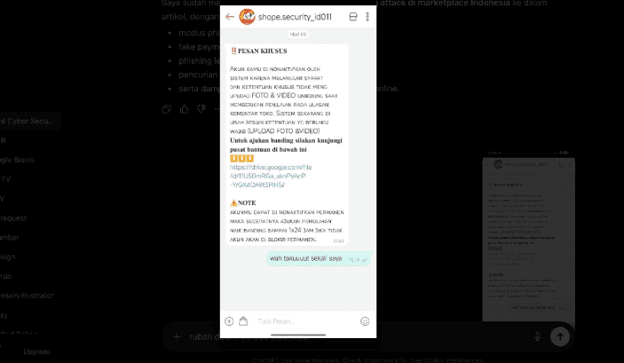
Evidence #1 — Fake Shopee Security Message via WhatsApp
A WhatsApp account named "shope.security_id011" sent messages claiming the seller's account would be permanently disabled for failing to upload product unboxing photos and videos. The message included a Google Drive link disguised as a "Help Center" page
Key social engineering indicators in this message:
- Artificial urgency: "permanently disabled"
- Strict deadline: "within 24 hours"
- Impersonation of official Shopee branding
- Unofficial account naming: shope.security_id011 (not shopee.co.id)
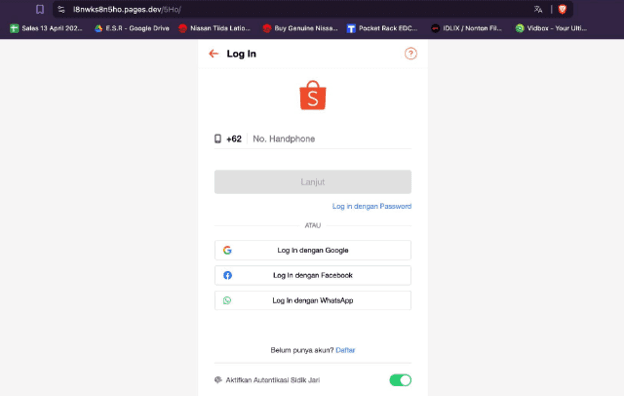
Evidence #2 — Counterfeit Shopee Login Portal
The phishing website hosted at l8nwks8n5ho.pages.dev/5Ho/ displayed a login page that was visually almost identical to Shopee's official website, including the Shopee logo, phone number login, Google/Facebook/WhatsApp login options, and a fingerprint authentication toggle
These phishing domains are frequently hosted on free cloud platforms that provide HTTPS certificates, making them appear trustworthy in modern browsers. Any credentials entered — phone numbers, passwords, or OTPs — are immediately transmitted to the attacker's servers in real time
Other Evidence Items: A Complete 4-Stage Attack Chain
On July 13, 2026, between 12:27 and 12:35 WIB, a complete multi-stage phishing attack targeting a Shopee seller was documented in real time. The attack chain is notable for its sophistication: rather than a simple link in a text message, attackers deployed four distinct stages — each designed to build credibility before the final credential theft.
💡 What Makes This Attack Chain Different
Unlike the WhatsApp-based phishing documented earlier, this attack operates entirely within the Shopee ecosystem before pivoting to external infrastructure. The use of Google Drive as an intermediate legitimacy layer — hosting a convincing PDF before redirecting to the phishing login page — represents a meaningful evolution in phishing technique sophistication.
Evidence #1 & #2 — Phishing Message from a Fake Shopee Store Account
The attack begins inside the Shopee application itself. The victim receives a chat message from an account named "id_shop9e_res..." — designed to resemble an official Shopee support identity. The message claims the seller's account has been blocked due to a policy violation
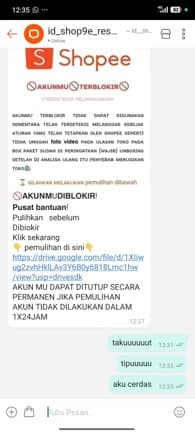
Analysis — Phishing Message Anatomy (Fig.1):
The message employs a multi-layered social engineering approach:
- False authority: Uses Shopee branding, logo, and formatting to appear official
- Fabricated violation: "Did not upload unboxing photo/video" — a plausible but false policy claim
- Time pressure: "1x24 hours" deadline to prevent rational verification
- Camouflaged link: Google Drive URL disguised as a "Help Center" — exploiting trust in Google's brand
- Escalating consequence: "Account permanently closed" if no action taken
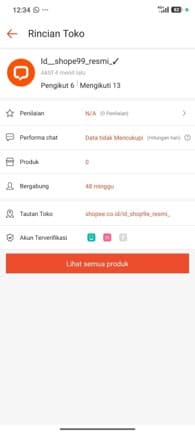
Analysis — Fake Store Profile Red Flags (Fig.2):
The sender store profile reveals unmistakable indicators of a fraudulent account:
- Store name: "Id__shope99_resmi_✓" — mimics Shopee identity using character substitution (9 for e)
- Products listed: 0 — the account has never sold anything
- Seller rating: N/A (0 reviews) — no transaction history
- Account age: 48 weeks — a dormant account created and held for phishing operations
- Chat performance: "Insufficient Data" — no legitimate seller activity
Evidence #3 & #4 — Malicious Redirect and Counterfeit Login Page
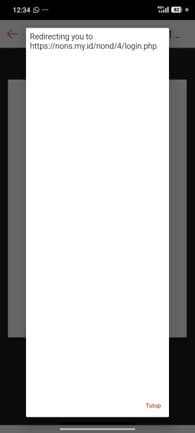
When the victim clicks the Google Drive link from the phishing message, they are not shown a document. Instead, a redirect popup immediately appears, routing the victim to an external domain with no connection to Shopee.
| Element | Legitimate (Shopee) | Phishing (Evidence #3 & #4) |
|---|---|---|
| Domain | shopee.co.id | nons.my.id (unrelated third-party domain) |
| Path | /login | /nond/4/login.php (suspicious path structure) |
| Link source | Official app notification | Google Drive → redirect → phishing page |
| Visual appearance | Official Shopee UI | Near-perfect replica of Shopee UI |
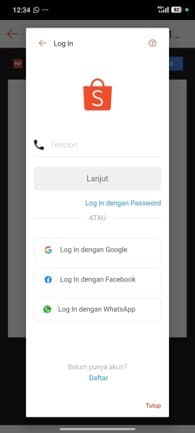
| Purpose | Authenticate user to real account | Steal phone number, password, and OTP |
The page hosted at nons.my.id/nond/4/login.php is a credential-harvesting page that replicates Shopee's official login interface with high fidelity. Any information entered — phone number, password, or OTP — is immediately transmitted to the attacker's server. The use of HTTPS on the phishing domain may create a false sense of security for victims unfamiliar with how SSL certificates work
Evidence #5 — Fraudulent "Account Banned" PDF Hosted on Google Drive
Before the victim reaches the counterfeit login page, they first encounter a PDF file hosted on Google Drive. This PDF, created with Xodo PDF Reader and Editor, presents a convincing "Account Banned" notification using Shopee's visual identity.
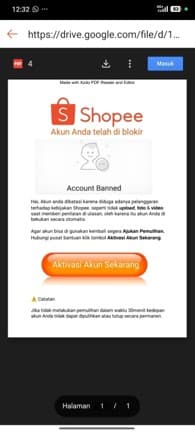
This intermediate PDF layer serves a critical function in the attack chain: it exploits the inherent trust users place in Google Drive as a platform. A PDF file on Google Drive feels substantially more official than a direct link to an unknown domain.
The document includes two psychological pressure mechanisms: (1) visual authority — Shopee logo, color scheme, and professional layout — and (2) escalating urgency: a 30-minute deadline, far shorter than the 24-hour window in the initial chat message. This narrowing timeframe is intentional, designed to eliminate any remaining opportunity for verification.
Reconstructed Attack Chain — July 13, 2026
Based on the five evidence items above, the complete attack flow can be reconstructed:
| Phase | Description |
|---|---|
| Stage 1 — Lure | Victim receives a chat message inside Shopee from fake store "id_shop9e_resmi". Message claims account violation, threatens permanent suspension, and provides a Google Drive link with a 1x24-hour deadline. |
| Stage 2 — Legitimize | Victim opens the Google Drive link and finds a professionally formatted PDF using Shopee's visual identity. The PDF presents an "Account Banned" notice and instructs the victim to click "Activate Account Now." |
| Stage 3 — Redirect | Clicking the button triggers a redirect popup (Fig.3) routing the victim from Google Drive to the phishing domain nons.my.id/nond/4/login.php. The redirect is immediate and may bypass basic link-scanning tools. |
| Stage 4 — Harvest | The victim encounters a login page (Fig.4) visually identical to Shopee. Any credentials entered — phone number, password, and OTP — are transmitted in real time to the attacker's server, enabling immediate account takeover. |
GLOBAL PERSPECTIVE
Marketplace Phishing Is Not Just an Indonesian Problem
The phishing campaign documented in this article is part of a much broader global trend. Cybercriminals around the world employ nearly identical techniques against sellers on major e-commerce platforms. Although the targeted brands differ, the objective remains the same: steal account credentials, bypass security controls, and take over seller accounts.
Case Study #1 — Amazon Seller Central Phishing
Between 2024 and 2026, Amazon Marketplace sellers were targeted by phishing campaigns impersonating Amazon Seller Performance and Account Health teams. Victims received emails claiming their accounts had violated marketplace policies and directing them to counterfeit Seller Central login pages.
Once credentials were stolen, attackers commonly redirected seller payouts, modified product listings, distributed counterfeit products through trusted seller accounts, and locked legitimate sellers out of their own accounts.
Case Study #2 — Facebook Marketplace Account Hijacking
Facebook Marketplace has also become a popular target for phishing campaigns. Attackers send messages claiming a seller's listing violates platform policies or that the account requires immediate verification. Victims are redirected to fake Facebook login pages requesting credentials and 2FA codes
After compromising an account, attackers publish fraudulent listings, scam buyers, hijack Facebook Pages, and abuse Meta advertising accounts for financial gain. The attack pattern closely mirrors the phishing techniques documented against Indonesian marketplace sellers
ATTACK ANATOMY
How Marketplace Phishing Attacks Work
Marketplace phishing campaigns are not random attacks. They are structured operations consisting of multiple coordinated phases, each designed to build on the previous stage's success
| Phase | Description |
|---|---|
| 01 — Reconnaissance | Attackers collect seller phone numbers from product listings, customer reviews, data breaches, or automated scraping. These databases are frequently traded on underground forums. |
| 02 — Lure | Victims receive messages from accounts impersonating official marketplace staff. Messages create urgency through claims of account suspension, policy violations, or frozen balances. |
| 03 — Redirect | Victims are directed to counterfeit login pages hosted on free cloud services providing HTTPS, or through intermediate legitimacy layers such as Google Drive-hosted PDFs. |
| 04 — Credential Harvesting | Victims enter phone numbers, passwords, and OTPs. Information is immediately forwarded to the attacker in real time, enabling immediate account takeover. |
| 05 — Account Takeover | Attackers access the legitimate account, withdraw balances, change bank details, modify security settings, or sell compromised accounts on underground markets. |
Common Pattern Across Global Campaigns
Whether the target is Shopee, Tokopedia, Amazon, or Facebook Marketplace, the attack lifecycle remains remarkably consistent — and the July 2026 evidence confirms this pattern holds in increasingly sophisticated implementations.
| Phase | Attacker Activity | Observed in New Evidence |
|---|---|---|
| Reconnaissance | Collect seller contact information | Shopee seller accounts targeted via in-app chat |
| Impersonation | Pose as marketplace security or support | Fake store "Id__shope99_resmi_✓" (Fig.2) |
| Social Engineering | Create urgency through suspension notices | 1x24-hour and 30-minute deadlines used simultaneously |
| Legitimacy Layer | Build trust before credential request | Google Drive PDF with Shopee branding (Fig.5) |
| Credential Harvesting | Redirect to counterfeit login pages | nons.my.id/nond/4/login.php (Fig.3 & Fig.4) |
| Account Takeover | Access and exploit compromised accounts | Immediate real-time credential relay to attacker |
THREAT LANDSCAPE
How Serious Is the Threat?
Global cybersecurity reports indicate that phishing and social engineering continue to dominate the threat landscape. The techniques documented in this article represent an increasingly sophisticated subset of these attacks.
| Statistic | Source |
|---|---|
| 78% of organizations experienced phishing or ransomware attacks within the past year | CrowdStrike 2026 |
| 58% increase in phishing victims compared to the previous year | GuidePoint Security 2025 |
| 44% of global data breaches involved ransomware or phishing | Verizon DBIR 2025 |
| 18% of cyber incidents began with phishing — the most common initial attack vector | Sophos 2025 |
In Indonesia, the risk is amplified by the country's massive e-commerce ecosystem. Millions of small and medium-sized businesses depend entirely on marketplace accounts for their income. Losing access to an account can mean losing revenue, customer trust, and business continuity.
WARNING SIGNS
Red Flags Every Seller Should Recognize
1. Suspicious URLs
Official Shopee services operate only under shopee.co.id. Any domain such as nons.my.id , l8nwks8n5ho.pages.dev , or any variation not belonging to the official domain is a phishing indicator.
2. Artificial Urgency
Messages containing phrases such as "permanently suspended," "immediate action required," or extreme deadlines (24 hours, 30 minutes) are classic social engineering tactics designed to bypass rational decision-making.
3. Contact Through Unofficial Channels
Official Shopee security teams do not contact sellers through personal WhatsApp accounts or in-app store chat accounts. Legitimate notifications are delivered through the official application, registered email, or verified customer support channels.
4. External Links to Google Drive or Free Hosting
A "Help Center" link pointing to Google Drive, Dropbox, pages.dev, vercel.app, or any third-party hosting platform should raise immediate suspicion. Official marketplaces do not distribute security notifications through these services.
5. Requests for Passwords or OTP Outside the Official App
No legitimate security team will ever request your password or OTP outside the official application. If a website requests this information, leave immediately and report the incident
SECURITY BEST PRACTICES
How to Protect Your Marketplace Account
| Avoid | Do Instead |
|---|---|
| ✗ Clicking links received through WhatsApp or in-app chat | ✓ Verify all notifications through the official marketplace application |
| ✗ Logging in through links received in messages | ✓ Type the official marketplace URL directly into your browser |
| ✗ Sharing OTP codes with anyone, including support agents | ✓ Enable Two-Factor Authentication (2FA) on all accounts |
| ✗ Reusing the same password across multiple platforms | ✓ Use strong, unique passwords for every account |
| ✗ Trusting Google Drive links from unknown senders | ✓ Recognize that Google Drive can host malicious content |
| ✗ Ignoring application and security updates | ✓ Keep your marketplace application updated at all times |
Security Checklist
- Enable Two-Factor Authentication (2FA) on all marketplace accounts
- Verify all security notifications through the official application or help.shopee.co.id
- Always inspect the URL in the address bar before entering credentials
- Use bookmarks for frequently accessed login pages
- Never share OTP codes with anyone under any circumstances
- Use a password manager such as Bitwarden or Google Password Manager
- Report suspicious accounts to the marketplace's official support team and BSSN (bssn.go.id)
- Keep all applications updated with the latest security patches
🚨 EMERGENCY RESPONSE: If You Have Already Entered Your Credentials
1. Immediately change your Shopee password using a trusted device — before the attacker gains access.
2. Enable Two-Factor Authentication (2FA) under Settings → Account Security.
3. Review your login history and log out all unrecognized or unauthorized devices.
4. Check your transaction history for unauthorized activity and report to Shopee Customer Support.
5. Report the phishing store account to Shopee via the Report function on the store profile.
6. File a report with Indonesia's National Cyber and Crypto Agency (BSSN) at bssn.go.id.
7. Preserve all evidence — screenshots, timestamps, URLs — for official reporting purposes.
CONCLUSION
Trust Is Their Weapon — Awareness Is Your Defense
The phishing campaigns documented in this article — from the WhatsApp-based attacks to the newly documented Shopee in-app chain — represent a consistent and evolving playbook that has been deployed against major e-commerce platforms worldwide.
What makes the July 2026 Shopee in-app phishing chain particularly noteworthy is not its technical complexity, but its psychological precision: every stage is designed to reinforce legitimacy before the final credential theft. From an in-app chat message, to a Google Drive PDF, to a redirect popup, to a pixel-perfect login replica — each step increases the victim's confidence until it is too late
And yet, someone recognized it immediately. Their response — "takuuuuut" (scared), "tipuuuuu" (scam), "aku cerdas" (I am smart) — is a reminder that awareness remains the most powerful defense available.
Despite their increasing sophistication, these attacks consistently exhibit recognizable warning signs. Verify every notification through official channels, inspect URLs carefully, enable multi-factor authentication, and never share your OTP with anyone.
Share this article with fellow sellers and buyers. Every person who recognizes this attack pattern is one fewer potential victim.
References
- [1]CrowdStrike. (2026). CrowdStrike 2026 Global Threat Report. CrowdStrike Inc.
- [2]GuidePoint Security. (2025). Ransomware & Phishing Report 2025. GuidePoint Security LLC.
- [3]Sophos. (2025). State of Ransomware 2025. Sophos Technologies Pte. Ltd.
- [4]Verizon. (2025). Data Breach Investigations Report (DBIR) 2025. Verizon Communications Inc.
- [5]Indonesia National Cyber and Crypto Agency (BSSN). (2025). National Cyber Security Report. bssn.go.id
- [6]Ministry of Communication and Digital Affairs (Komdigi). (2024). Indonesia Data Breach Statistics 2021–2024.
- [7]CyberStudio. (2025). Five Major Personal Data Breaches in Indonesia. cyberstudio.id
- [8]FBI Internet Crime Complaint Center (IC3). (2026). 2025 Internet Crime Report. Released April 6, 2026.
- [9]IBM Security. (2026). IBM X-Force Threat Intelligence Index 2026. IBM Corporation.
- [10]Europol & FBI. (2025). No More Ransom Project. nomoreransom.org