Abstract
PT. Tjakrabirawa Teknologi Indonesia was engaged by a client to conduct a Red Teaming assessment aimed at evaluating the organization's ability to detect, prevent, and respond to simulated real-world attacks. As part of the engagement, Physical Pentest was considered as one of the potential initial access vectors, subject to the defined scope and objectives of the assessment.
This article focuses on the Event Triggered Execution: Accessibility Features technique, in which accessibility features available on an operating system can become part of an attack path when an adversary has physical access to a target device. The discussion covers the fundamental concepts of Red Teaming, initial access vectors, Physical Pentest, and Event Triggered Execution through Accessibility Features.
So, what exactly are Red Teaming, an initial access vector, and Physical Pentest? How can Physical Pentest be utilized as part of an attack path within a Red Teaming operation? This article explores these concepts in greater depth, including the methodology and stages involved in conducting a Physical Pentest using the Event Triggered Execution: Accessibility Features technique.
The objective of this article is to provide an understanding of how physical security and operating system features can intersect within a Red Team scenario, with particular emphasis on the Event Triggered Execution: Accessibility Features technique and its role within a controlled attack path involving unauthorized physical access.
1. Introduction
As organizations increasingly depend on digital systems and endpoint devices to support their daily operations, cybersecurity assessments have become an important part of evaluating an organization's security posture. Traditional security assessments often focus on vulnerabilities within network infrastructure, web applications, and internet-facing services. However, an attacker may also take advantage of opportunities that exist outside the traditional digital attack surface, including physical access to an organization's facilities and endpoint devices.
This is where Red Teaming provides a broader perspective on security assessment. Red Teaming simulates the behavior of a real-world adversary by combining multiple attack techniques and attack vectors to achieve a predefined objective. Rather than focusing solely on identifying individual vulnerabilities, a Red Team operation attempts to demonstrate how seemingly unrelated weaknesses can be chained together to form a complete attack path.
One of the important components within an attack path is Initial Access, which refers to the methods used by an adversary to obtain an initial foothold within a target environment. Initial access can be achieved through various vectors, including exploitation of public-facing applications, compromised credentials, social engineering, and physical access. When physical access is included within the scope of an engagement, Physical Pentest can be used to assess whether an attacker can leverage access to a facility or endpoint device as part of the broader attack path.
Physical access to an endpoint can provide an attacker with opportunities that may not be available through remote attacks. An attacker who is able to interact directly with a target device may encounter legitimate operating system functionality that can be abused to facilitate subsequent stages of an attack. One example of such functionality is the Accessibility Features provided by modern operating systems.
This article focuses on the Event Triggered Execution: Accessibility Features technique as a scenario within a Physical Pentest. The technique demonstrates how an operating system's accessibility functionality can become relevant to an attack path when an attacker has obtained physical access to a target endpoint. Instead of treating physical access as the final objective, the scenario examines how an event or condition associated with an accessibility feature can be used as a trigger for subsequent execution.
The discussion begins with an overview of Red Teaming, Initial Access Vectors, and Physical Pentest to establish the context of the assessment. It then moves into the concept of Event Triggered Execution, the role of Accessibility Features within this technique, and how the technique can be incorporated into a controlled Red Teaming attack path.
Through this discussion, the article aims to provide a practical understanding of how legitimate operating system functionality can become part of an adversarial attack chain when combined with physical access, and why seemingly benign system features should also be considered when evaluating an organization's overall attack surface.
2. Real-World Cases
The abuse of Windows Accessibility Features is not merely a theoretical attack scenario. The technique has been documented in real-world intrusions involving multiple threat actors. MITRE ATT&CK currently maps T1546.008 – Accessibility Features to several adversary groups, including APT29, APT3, APT41, Axiom, and Deep Panda.
2.1. APT29
APT29, also known as Cozy Bear, has been documented using the Sticky Keys technique to obtain unauthenticated, privileged console access. MITRE ATT&CK identifies this activity under T1546.008 – Accessibility Features.
A detailed Google Cloud/Mandiant report describes an APT29 intrusion in which the attackers replaced the Windows sethc.exe Sticky Keys binary with cmd.exe . When Sticky Keys was triggered from the Windows logon screen, the modified executable provided a privileged command shell without requiring normal authentication. The report also describes how the attackers used RDP tunneling to access the affected systems.
This case is particularly relevant to the article because it demonstrates the relationship between:
Accessibility Feature A↓Sticky Keys↓sethc.exe↓Modified Execution Path↓Privileged Console
2.2. APT3
APT3, also known as Gothic Panda, has also been associated with the abuse of Accessibility Features. MITRE ATT&CK states that APT3 replaced the Sticky Keys binary C:\Windows\System32\sethc.exe as a persistence mechanism.
MITRE's APT3 adversary emulation documentation provides additional context. It describes the replacement of sethc.exe with cmd.exe and explains that this allowed an operator connecting through RDP to obtain a command prompt without providing valid credentials. The same documentation also notes that APT3 used account creation and local administrator privileges as part of its persistence strategy.
This case is particularly interesting in relation to the PoC presented in this article because it demonstrates a similar progression:
Sticky Keys Replacement↓RDP / Logon Screen↓Command Execution↓Persistence↓Privileged Account
2.3. APT41
APT41, also known as Wicked Panda, has been documented using Sticky Keys as a persistence mechanism. MITRE ATT&CK maps this activity to T1546.008 – Accessibility Features.
Mandiant's APT41, A Dual Espionage and Cyber Crime Operation provides additional documentation of the group's activity and maps Accessibility Features to its persistence techniques.
The APT41 case demonstrates that Accessibility Features abuse is not limited to a single threat actor or a single type of intrusion. The technique has been incorporated into broader attack operations as a mechanism for maintaining access to compromised Windows systems.
2.4. Axiom
Axiom is another threat group associated with the abuse of Accessibility Features. According to MITRE ATT&CK, Axiom actors have used Sticky Keys replacement within RDP sessions to obtain persistence.
This case is noteworthy because it demonstrates that the technique can be used in conjunction with Remote Desktop Protocol (RDP). The attacker does not necessarily need to be physically present at the endpoint at the time the Accessibility Feature is triggered; once the relevant modification has been made, the mechanism can potentially be leveraged through a remote logon interface.
The attack path can therefore be represented conceptually as:
Initial Compromise↓Modify Accessibility Component↓RDP Access↓Windows Logon Screen↓Trigger Accessibility Feature↓Privileged Execution
This demonstrates how Accessibility Features can transition from a local system modification into a mechanism for maintaining remote access.
2.5. Deep Panda
Deep Panda, also known as Shell Crew, WebMasters, KungFu Kittens, PinkPanther, and Black Vine, has also been associated with the Sticky Keys technique.
MITRE ATT&CK documents that Deep Panda used the Sticky Keys technique to bypass the RDP login screen on remote systems during intrusions.
Additional documentation from Cobalt Strike describes a Deep Panda intrusion in which the attackers enabled an RDP Sticky Keys backdoor on target systems and subsequently used RDP to obtain a SYSTEM-level command shell.
This case highlights an important aspect of the technique: Accessibility Features can potentially be used not only for persistence but also as a mechanism to bypass the conventional authentication workflow on a remotely accessible Windows system.
Compromised System↓Enable Sticky Keys Backdoor↓RDP↓Windows Logon Screen↓Sticky Keys Trigger↓SYSTEM Command Shell
2.6. Summary
The five cases above demonstrate that Accessibility Features abuse has been observed across multiple threat actors and intrusion scenarios, rather than being limited to a single campaign. MITRE ATT&CK explicitly associates APT29, APT3, APT41, Axiom, and Deep Panda with T1546.008 – Accessibility Features.
| Threat Actor | Observed Use |
|---|---|
| APT29 | Sticky Keys for unauthenticated privileged console access |
| APT3 | Replacement of sethc.exe for persistence |
| APT41 | Sticky Keys for persistence |
| Axiom | Sticky Keys replacement through RDP sessions |
| Deep Panda | Sticky Keys to bypass RDP logon |
These cases provide real-world context for the technique discussed in this article. They also establish a useful connection between the documented attack scenarios and the controlled reproduction presented later in the article.
Later in the article, the technique will be reproduced in an authorized Windows test environment, with each stage documented through screenshots to demonstrate how the Accessibility Feature → Event Trigger → Execution chain can be reproduced in practice.
3. Red Teaming
Red Teaming is a security assessment approach designed to simulate the tactics, techniques, and procedures (TTPs) of a real-world adversary against an organization. The primary objective is to determine whether an attacker can progress from an initial point of access toward a predefined objective by combining multiple attack techniques and exploiting weaknesses across different layers of the organization's environment.
Unlike a conventional vulnerability assessment, which primarily focuses on identifying and reporting individual vulnerabilities, Red Teaming takes a broader and more adversarial approach. A Red Team may encounter a vulnerability that, by itself, has limited impact, but can become significantly more impactful when combined with other weaknesses. The assessment therefore focuses on the attack path and the ability to achieve the defined objective rather than simply the number of vulnerabilities identified.
A typical Red Team operation can involve multiple stages, depending on the scope and objectives of the engagement. These stages may include:
- Reconnaissance — gathering information about the target organization, infrastructure, personnel, facilities, and technologies.
- Initial Access — obtaining an initial foothold through an available attack vector.
- Execution — executing code, commands, or other actions within the target environment.
- Privilege Escalation — obtaining higher levels of privileges than those initially available.
- Discovery — identifying systems, accounts, network resources, and other information relevant to the attack.
- Credential Access — attempting to obtain credentials or authentication material that can facilitate further access.
- Lateral Movement — moving from an initially compromised system to other systems within the environment.
- Objective Execution — achieving the predefined objective established during the engagement.
- Cleanup and Reporting — removing artifacts created during the assessment and documenting the attack path, findings, and overall results.
These stages should not be interpreted as a rigid sequence. A Red Team operation is dynamic, and the techniques used at each stage depend on the opportunities discovered during the engagement. For example, an attacker may obtain initial access through physical access to an endpoint and subsequently use a local operating system feature to achieve execution. This execution may then provide an opportunity to continue toward the next stage of the attack.
In the context of this article, the focus is placed on the relationship between Physical Access, Initial Access, and Execution. Physical access does not necessarily represent the final objective of an attack. Instead, it can serve as an entry point that enables an attacker to interact directly with an endpoint and leverage functionality available within the operating system.
This concept is particularly relevant to the Event Triggered Execution: Accessibility Features scenario discussed in the following sections. In this scenario, physical access provides the opportunity to interact with the target endpoint, while an accessibility-related mechanism becomes part of the subsequent execution path.
Therefore, understanding Red Teaming as an attack-path-based assessment is important for understanding why techniques that may appear unrelated to traditional network or application vulnerabilities can still play a significant role in a real-world attack scenario. Physical access, legitimate operating system functionality, and execution mechanisms can be combined to form a meaningful attack path within a controlled Red Teaming engagement.
4. Initial Access Vector
Initial Access refers to the methods or techniques used by an adversary to gain an initial foothold within a target environment. It represents an important stage in a Red Teaming operation because it establishes the starting point from which an attacker can continue to perform subsequent activities.
The term Initial Access Vector describes the specific path or mechanism through which this initial foothold is obtained. In a real-world attack, an adversary may have multiple potential vectors available depending on the target's security posture, exposed services, user behavior, physical security, and other environmental factors.
Common examples of initial access vectors include:
- Public-Facing Applications — exploiting vulnerabilities or weaknesses in applications exposed to the internet.
- Valid Accounts — obtaining or abusing legitimate credentials to access systems or services.
- Phishing and Social Engineering — manipulating users into providing credentials, executing malicious content, or performing actions that facilitate access.
- External Remote Services — abusing exposed remote access services such as VPN, remote desktop, or other remote management interfaces.
- Supply Chain or Third-Party Access — leveraging compromised or trusted third-party systems, software, or accounts.
- Physical Access — obtaining direct access to facilities, workstations, servers, removable media, or other physical resources.
The availability of a particular initial access vector depends heavily on the scope and objectives of a Red Teaming engagement. Not every assessment requires an attacker to compromise an internet-facing application or obtain a user's credentials. In certain scenarios, the assessment may intentionally simulate an adversary who is able to obtain physical access to a target environment.
In such a scenario, Physical Pentest can serve as an initial access vector. The objective is not necessarily to compromise the physical facility itself, but to determine whether physical access can provide an attacker with an opportunity to interact with an endpoint or other system and continue the attack path.
This distinction is important because Physical Pentest and Initial Access are not synonymous. Physical Pentest describes the assessment approach used to evaluate security from a physical perspective, while Initial Access describes the position within the attack lifecycle where an attacker establishes a foothold. Physical access can therefore function as the mechanism that enables initial access within a broader Red Teaming attack path.
In the context of this article, the initial access scenario begins with physical access to a target endpoint. Once access to the endpoint is available, the assessment moves beyond the physical layer and examines how legitimate operating system functionality can become part of the subsequent attack chain.
The focus then shifts to Event Triggered Execution: Accessibility Features. Rather than treating physical access as the final objective, this scenario explores how an accessibility-related mechanism can be incorporated into an attack path to facilitate execution on the target system.
Understanding the relationship between Initial Access, Physical Access, and Execution provides the foundation for examining the technique discussed in the following section.
5. Physical Pentest
Physical Pentest is a security assessment methodology used to evaluate whether physical access to an organization's facilities, devices, or infrastructure can be leveraged to compromise security controls or gain unauthorized access to systems and information. Unlike assessments that are performed entirely through remote or digital interfaces, Physical Pentest considers the physical environment as part of the organization's overall attack surface.
In a Red Teaming engagement, Physical Pentest can be used to simulate scenarios in which an adversary has the opportunity to interact directly with the target environment. This may include attempting to gain access to restricted areas, accessing unattended workstations, interacting with endpoint devices, or identifying physical weaknesses that could provide a path toward the engagement's predefined objective.
The scope of a Physical Pentest can vary depending on the objectives and Rules of Engagement (RoE) established before the assessment. Common areas that may be considered include:
- Physical Access Controls — doors, locks, access cards, security gates, and other mechanisms used to restrict entry.
- Restricted Areas — server rooms, network infrastructure areas, offices, or other locations containing sensitive systems and information.
- Endpoint Devices — workstations, laptops, kiosks, and other devices that may be accessible to an individual with physical presence.
- Unattended Devices — systems that are left accessible without adequate physical protection or session controls.
- Removable Media and Peripheral Interfaces — USB ports and other interfaces that may provide opportunities for interaction with an endpoint.
- Environmental Information — information exposed through documents, screens, labels, or other physical resources that may assist an attacker.
The significance of Physical Pentest within a Red Teaming operation lies in its ability to demonstrate how a physical weakness can become part of a broader attack path. An attacker does not necessarily need to compromise a remote service if physical access provides another means of interacting with a target system.
A simplified attack path can be represented as follows:
Physical Reconnaissance↓Physical Access↓Target Identification↓Endpoint Interaction↓Initial Access↓Excecution↓Objective
However, Physical Pentest should not be interpreted simply as an attempt to enter a building or access a restricted area. In the context of Red Teaming, physical access is often only the starting point of a larger attack scenario. The value of the assessment comes from understanding what an attacker can accomplish after obtaining that access.
For example, once an attacker gains physical access to an endpoint, they may be able to interact with the operating system directly. At this stage, legitimate system functionality that is normally intended to assist users may become relevant to the attack path. This includes Accessibility Features, which are designed to improve system usability for users with accessibility requirements.
The use of legitimate operating system functionality is particularly relevant to the concept of Event Triggered Execution. Rather than relying solely on traditional software vulnerabilities, an attack scenario may involve a specific event or system condition that causes an execution mechanism to be invoked. When combined with physical access, such a mechanism can provide an attacker with an alternative path toward execution on the target endpoint.
Therefore, in this assessment scenario, Physical Pentest serves as the bridge between the physical attack surface and the technical attack surface. The physical access itself represents the initial opportunity, while the subsequent interaction with the endpoint and its operating system functionality forms the next stage of the attack path.
The following section focuses specifically on Event Triggered Execution: Accessibility Features, examining how accessibility functionality can become relevant within this Physical Pentest and Red Teaming scenario.
6. Event Triggered Execution: Accessibility Features
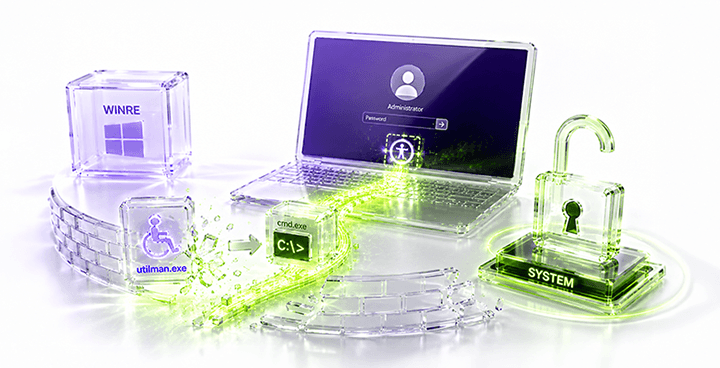
Event Triggered Execution: Accessibility Features is a technique in which an adversary abuses legitimate accessibility functionality provided by an operating system to facilitate execution or maintain access to a system. In the MITRE ATT&CK framework, this technique is identified as T1546.008 and is categorized under Event Triggered Execution. The technique applies to Windows environments and includes the abuse of accessibility programs such as sethc.exe and utilman.exe .
Both utilman.exe and sethc.exe represent examples of Windows accessibility-related components that may be abused within the T1546.008 technique. The real-world cases discussed in this article primarily demonstrate the abuse of Sticky Keys (sethc.exe), while the reproduction section focuses specifically on Utilman (utilman.exe).
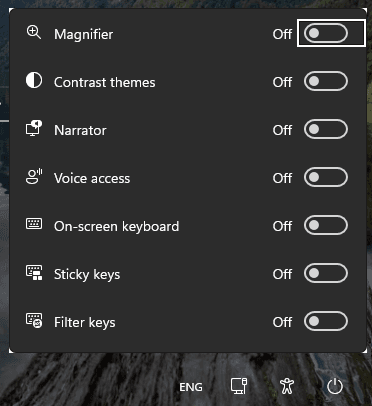
Accessibility Features are legitimate operating system components designed to assist users with disabilities or provide alternative methods of interacting with a computer. Examples include utilities such as the On-Screen Keyboard, Narrator, Magnifier, and other Ease of Access functionality. Under normal circumstances, these components serve legitimate purposes and are an important part of the operating system's usability.
From a security perspective, however, the availability of certain accessibility mechanisms at the Windows sign-in interface creates an interesting attack surface. An attacker who has obtained sufficient physical access to a device may attempt to abuse these mechanisms to invoke a process or executable under circumstances where the normal user authentication process has not yet been completed.
6.1. Accessibility Features as an Attack Path
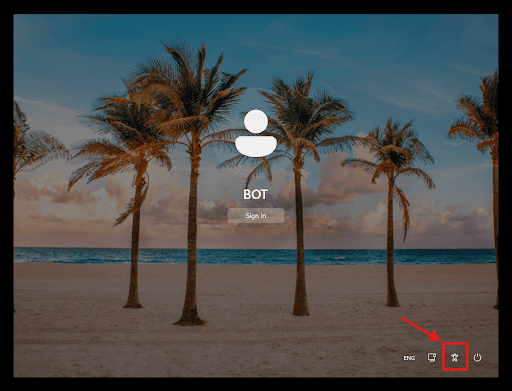
The security relevance of Accessibility Features comes from the execution context in which some of these components can be invoked. Certain accessibility programs can be accessed from the Windows sign-in screen, meaning that their functionality may be available before a user has successfully authenticated.
This characteristic becomes particularly relevant when combined with physical access.
A simplified attack path can be represented as follows:
Physical Access↓Target Windows Endpoint↓Acessibility Feature↓Event Trigger↓Accessibility Component↓Execution↓Post Execution Activity
The important aspect of this attack path is that the attacker does not necessarily need to begin with a remotely exploitable vulnerability. Instead, physical access provides the initial opportunity, while legitimate operating system functionality provides the mechanism for progressing toward execution.
MITRE ATT&CK documents this technique as an example of abusing accessibility programs, including sethc.exe and utilman.exe , to execute programs in the context of the operating system.
6.2. Utilman Hijacking
One example that demonstrates this concept on Windows is Utilman hijacking.
Utilman.exe is associated with the Windows Ease of Access functionality available from the Windows sign-in interface. Under normal circumstances, the accessibility functionality provides users with access to legitimate assistive tools before or during the sign-in process.
From a security assessment perspective, the behavior of this mechanism can be examined to understand whether modification or replacement of the accessibility executable can cause a different process or executable to be launched when the corresponding accessibility functionality is triggered.
This technique is particularly relevant to a Physical Pentest because it demonstrates how an attacker with sufficient physical access to an endpoint may attempt to use a legitimate operating system mechanism as part of an alternative execution path.
It is important to distinguish this scenario from a conventional remote exploitation technique. The attack depends on a combination of physical access, local system state, operating system behavior, and the ability to modify or otherwise influence the relevant system component. Consequently, the technique should be evaluated within the context of the complete attack path rather than considered as an isolated vulnerability.
6.3. Security Significance
The significance of T1546.008 lies in the fact that the technique demonstrates how trusted operating system functionality can potentially be incorporated into an adversarial attack chain. Rather than relying exclusively on network-based exploitation, an attacker with physical access may attempt to leverage functionality that already exists within the operating system.
This is particularly important for environments where endpoints contain sensitive information or provide access to internal networks. If an attacker can progress from physical access to privileged execution, the compromised endpoint may subsequently become a stepping stone toward other objectives.
Therefore, Accessibility Features should not be viewed as a standalone vulnerability. Instead, they should be considered as one component of a broader attack path involving:
Physical Security+System recovery+Operating system Functionality+Execution↓Potential Attack Path
6.4. Why This Technique Is Relevant to Red Teaming
The significance of this technique is not limited to whether Utilman.exe can be manipulated. From a Red Teaming perspective, the more important question is how a seemingly legitimate operating system feature can become part of an attack path when combined with physical access.
This illustrates an important principle in Red Teaming: an attack does not always depend on discovering a new software vulnerability. An adversary may instead combine existing system functionality with a particular access condition to achieve an objective.
Therefore, Event Triggered Execution: Accessibility Features provides a useful example of how the physical and technical attack surfaces can intersect. In the context of this assessment, the technique demonstrates how physical access to a Windows endpoint can be combined with legitimate operating system functionality to establish an execution path.
The following section demonstrates how this scenario can be reproduced in a controlled and authorized Windows environment through a step-by-step Utilman hijacking exercise.
7. How to Reproduce
To demonstrate the Event Triggered Execution: Accessibility Features scenario, a controlled test environment can be used to reproduce the behavior associated with Utilman hijacking. The reproduction should be performed only on systems that are owned by the tester or explicitly authorized for security testing.
The reproduction process is documented step by step using screenshots to illustrate the state of the system before, during, and after the relevant changes.
Step 1 — Prepare the Test Environment
The first step is to prepare an isolated Windows test environment in which the technique can be reproduced safely. The environment should contain a Windows endpoint with the relevant Accessibility Features available.

Step 2 — Identify the Accessibility Feature
The relevant Accessibility Feature should then be identified and its normal behavior documented. This establishes the expected behavior of the operating system before the test is performed.
Step 3 — Enter Windows Recovery Environment
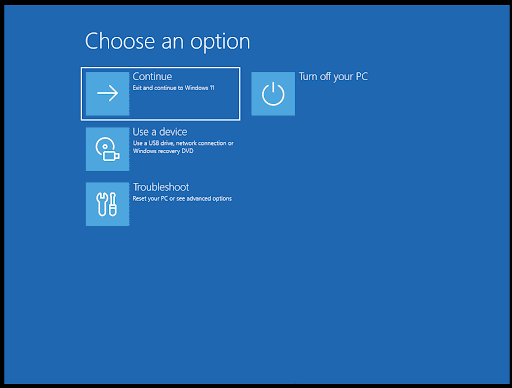
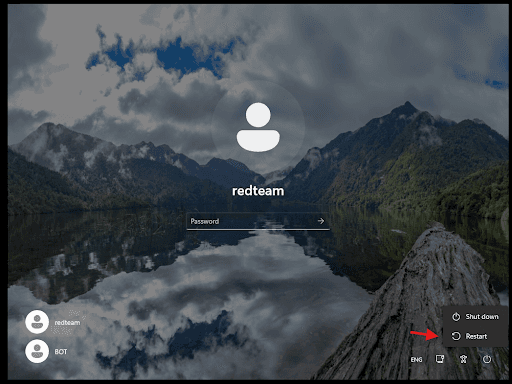
The next step is to access the Windows Recovery Environment (WinRE). From the Windows interface, hold the Shift key while selecting Restart. Windows will then restart and display the recovery options.
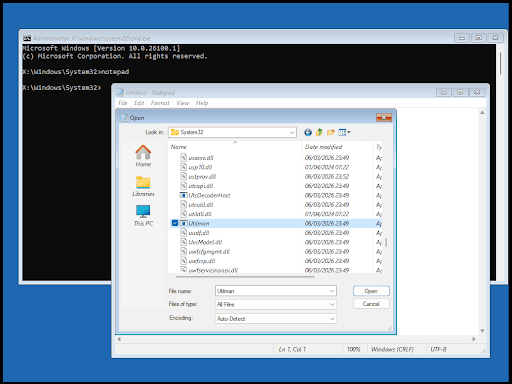
The Windows Recovery Environment provides access to several system recovery and troubleshooting functions outside the normal Windows operating environment. For this assessment scenario, WinRE is relevant because it provides an environment from which system-level operations can be performed during the controlled test.

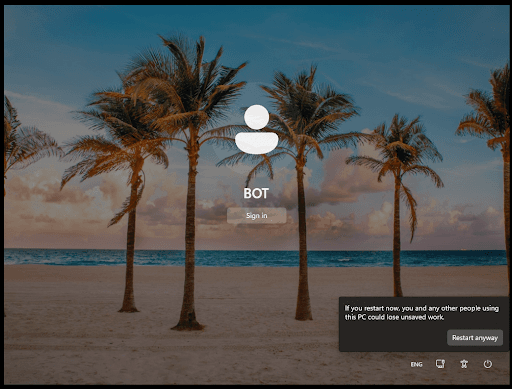
This warning appears because it could result in the loss of unsaved data.
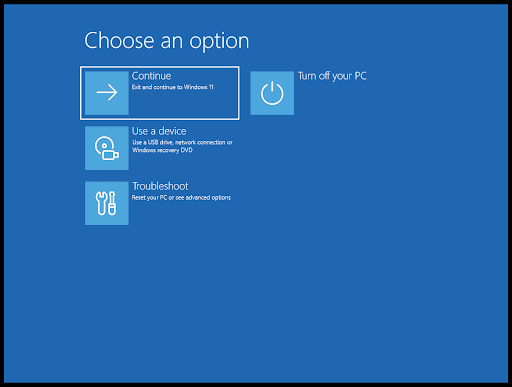
If you have not yet entered the WinRE menu, repeat the restart process until you do. Alternatively, if it still fails, the system may be preventing standard users from accessing that menu; in that case, the Event Triggered Execution method cannot be used.
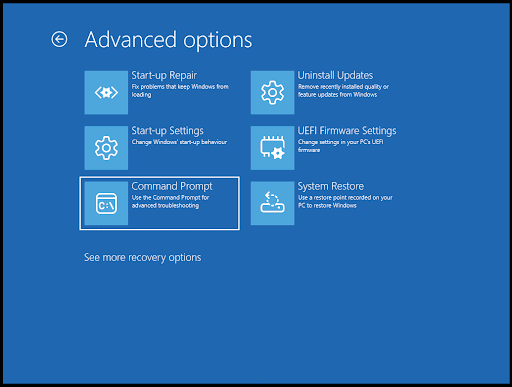
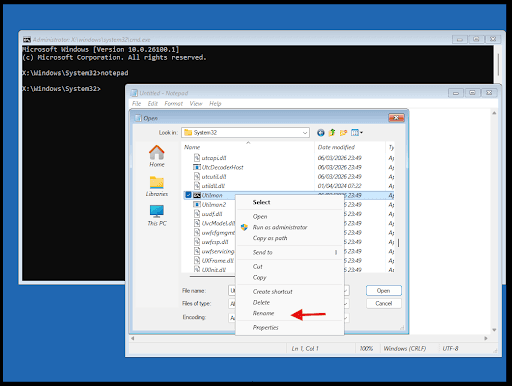
Step 4 — Perform the Controlled Modification
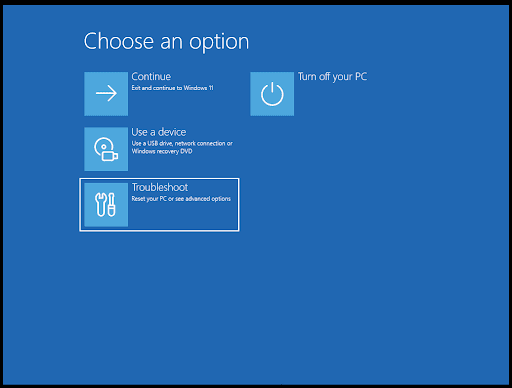
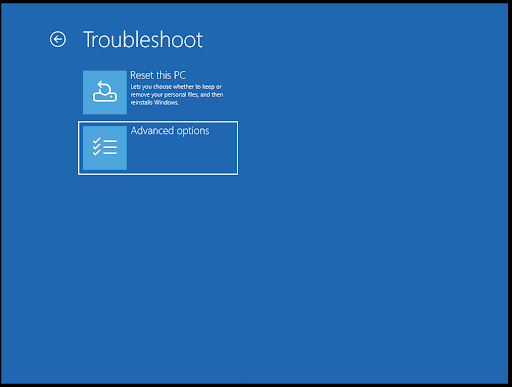
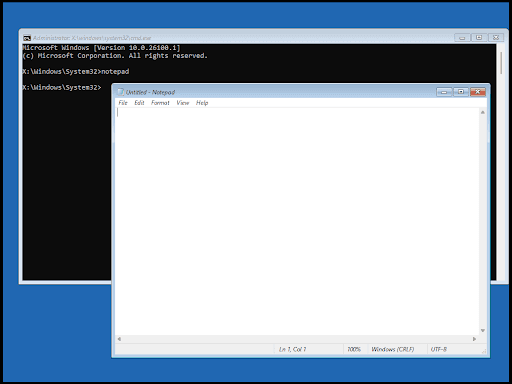
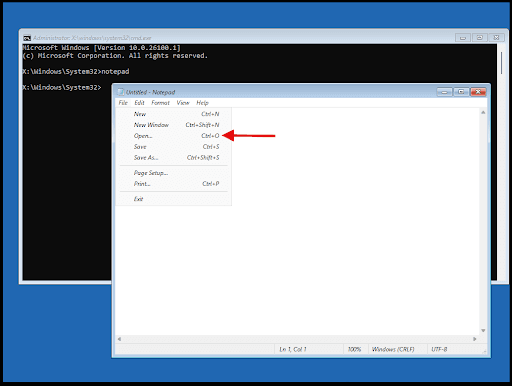
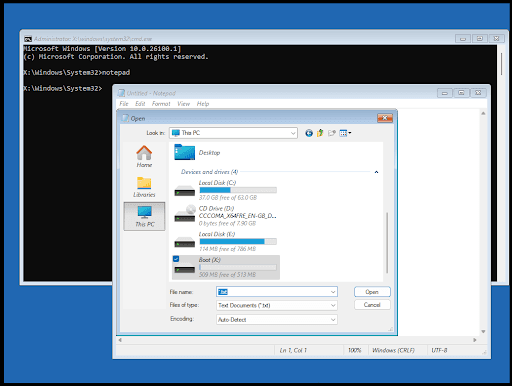
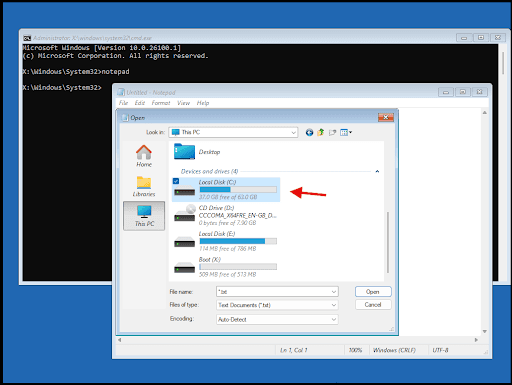
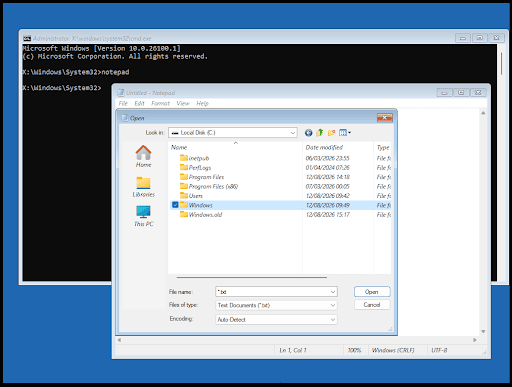
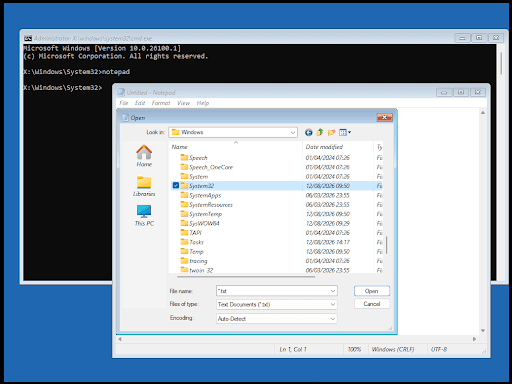
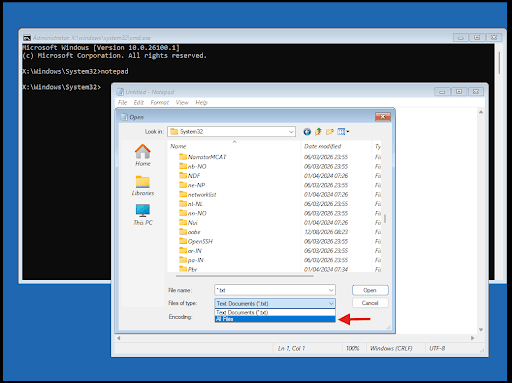
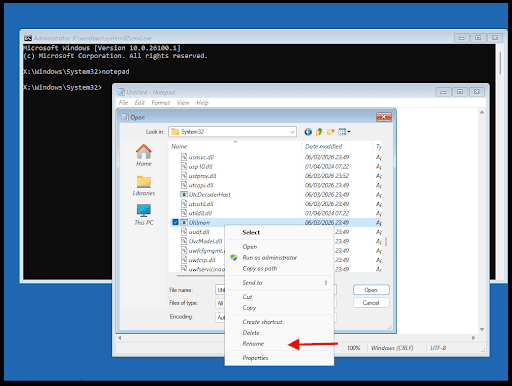
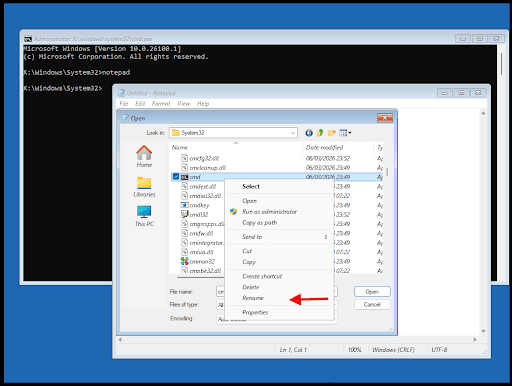
After entering the appropriate recovery environment, the controlled modification required for the Utilman hijacking scenario can be performed.
Step 5 — Trigger the Accessibility Feature
After the modification has been completed, the relevant Accessibility Feature is triggered from the appropriate Windows interface.
This step represents the event-triggered portion of the technique: an interaction with the Accessibility Feature causes the modified execution path to be invoked.
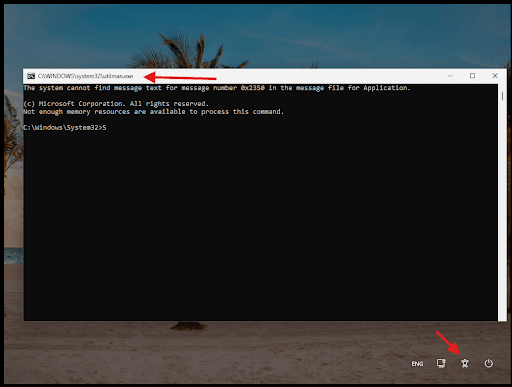
Step 6 — Validate Privileged Access
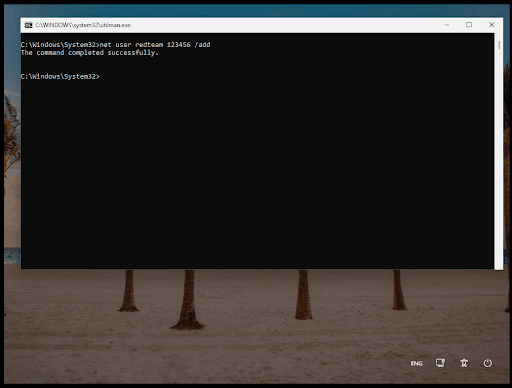
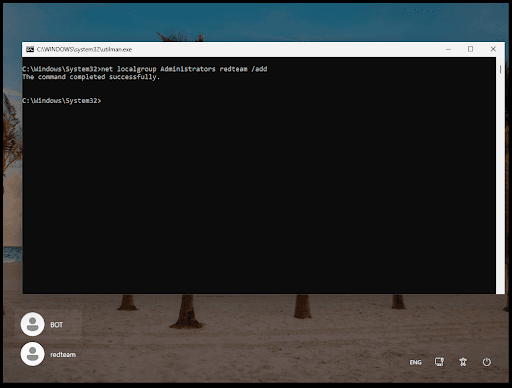
After the execution has been successfully obtained, the next step is to demonstrate the potential impact by creating a new local user account and adding the account to the local Administrators group.
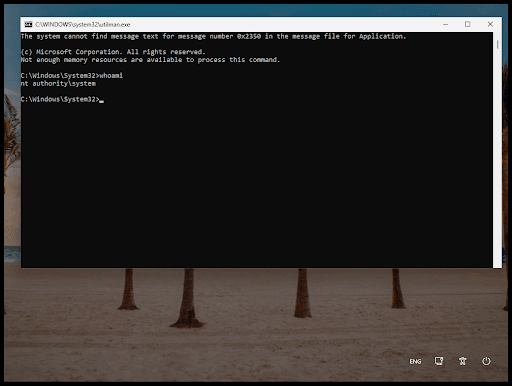
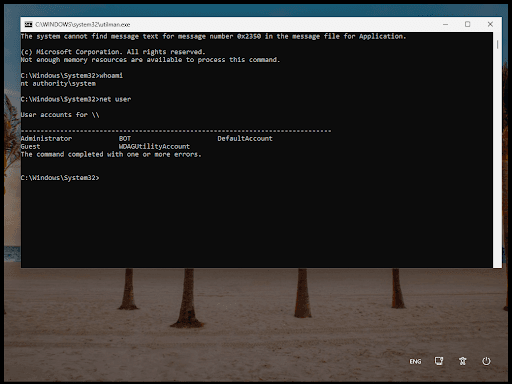
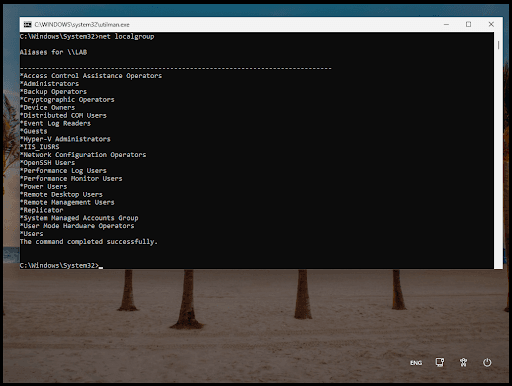
Step 7 — Validate the Result
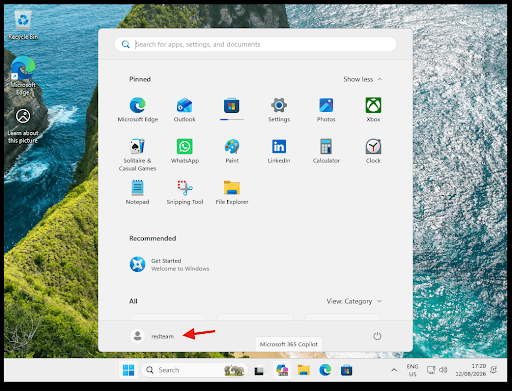
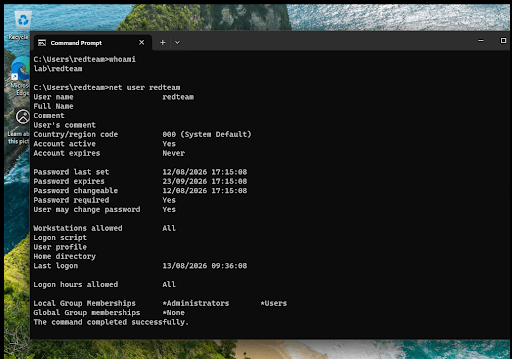
The resulting execution context should be validated within the controlled environment. This allows the tester to confirm that the intended execution path was successfully reproduced.
Step 8 — Restore the Original Configuration
After the reproduction has been completed, all modifications should be reverted and the original system configuration restored.
Reproduction Summary
The reproduction demonstrates the relationship between physical access, Accessibility Features, event triggering, and execution:
Physical Security↓Accessibility Feature↓Utilman↓Controlled Modification↓Event Trigger↓Alternative Execution
Through this reproduction, the Event Triggered Execution: Accessibility Features scenario can be demonstrated in a controlled environment while clearly illustrating how a legitimate operating system feature can become part of a broader attack path.
8. Mitigation and Recommendation
The Event Triggered Execution: Accessibility Features scenario demonstrates how physical access, system recovery functionality, and legitimate Windows accessibility mechanisms can potentially be combined to create an attack path. Mitigation should therefore address not only the accessibility mechanism itself, but also the physical and system-level conditions required for the attack to succeed.
8.1. Strengthen Physical Security Controls
Physical access should be treated as an important component of endpoint security. Organizations should implement appropriate physical access controls to prevent unauthorized individuals from gaining direct access to workstations and other critical devices.
Recommended measures include:
- Restrict physical access to workstations and sensitive areas.
- Implement access control mechanisms such as badges, access cards, or biometric authentication where appropriate.
- Ensure visitors are accompanied when entering restricted areas.
- Secure unattended workstations and prevent unauthorized access to endpoint devices.
- Apply appropriate physical security controls to offices, server rooms, and other areas containing critical infrastructure.
The objective is to reduce the likelihood that an unauthorized individual can obtain the physical access required to interact directly with an endpoint.
8.2. Implement Strong Endpoint Authentication
Strong authentication controls should be implemented to prevent an attacker from easily obtaining access to an existing user session or account.
Organizations should consider:
- Enforcing strong password policies.
- Implementing multi-factor authentication where supported.
- Enabling Windows Hello or other strong authentication mechanisms where appropriate.
- Configuring automatic screen locking after a defined period of inactivity.
- Preventing unauthorized users from accessing logged-in workstations.
Authentication controls provide an additional layer of protection when physical access cannot be completely prevented.
8.3. Protect Windows Recovery Environment
The Windows Recovery Environment (WinRE) can provide access to system recovery and troubleshooting functionality outside the normal Windows operating environment. Organizations should therefore consider the security implications of unrestricted physical access to recovery mechanisms.
Recommended controls include:
- Protecting devices with BitLocker or equivalent full-disk encryption.
- Protecting recovery keys through appropriate administrative controls.
- Enabling Secure Boot where supported.
- Restricting unauthorized boot options and external boot media through UEFI/firmware configuration.
- Applying appropriate firmware/UEFI passwords or administrative controls.
- Ensuring that physical access to the device does not provide an easy path to modify or access protected system data.
Full-disk encryption is particularly important because physical access to a device should not automatically provide unrestricted access to its underlying storage.
8.4. Restrict Unauthorized Modification of System Components
Critical Windows system components should be protected against unauthorized modification.
Organizations should:
- Maintain appropriate file and directory permissions.
- Avoid granting standard users unnecessary administrative privileges.
- Monitor changes to protected system files.
- Use endpoint security controls capable of detecting suspicious modification of system components.
- Keep Windows systems updated with the latest security patches and supported security configurations.
The objective is to prevent an attacker who obtains physical access from easily modifying components that are subsequently invoked by the operating system.
8.5. Apply the Principle of Least Privilege
The ability to create a new local administrator account represents a significant escalation of privileges. Organizations should therefore minimize the number of accounts with local administrative privileges.
Recommended practices include:
- Limit membership in the local Administrators group.
- Use standard user accounts for routine activities.
- Apply Local Administrator Password Solution (LAPS) or an equivalent privileged account management solution where appropriate.
- Prevent users from sharing administrative credentials.
- Regularly review local administrator group membership.
- Remove unnecessary or obsolete local accounts.
Reducing administrative privileges limits the potential impact of an attacker who obtains code execution on an endpoint.
8.6. Monitor Critical Account and Group Changes
Because the attack scenario can progress from execution to the creation of a privileged local account, organizations should monitor changes to local accounts and privileged groups.
Security monitoring should consider generating alerts for activities such as:
- Creation of new local administrator accounts.
- Addition of users to the local Administrators group.
- Unexpected changes to privileged group membership.
- Modification of critical system files.
- Suspicious activity originating from recovery or boot environments.
These events can provide valuable indicators of compromise when an attacker attempts to establish persistent privileged access.
8.7. Maintain Endpoint Security Controls
Endpoint security solutions should be configured to provide appropriate protection against suspicious process execution, privilege escalation, persistence, and system modification.
Organizations should ensure that:
- Endpoint protection is enabled and properly configured.
- Security agents are protected against unauthorized termination or modification.
- Security policies are consistently applied across endpoints.
- Endpoint telemetry is retained for an appropriate period.
- Security alerts are reviewed and investigated according to the organization's incident response procedures.
8.8. Recommended Defense-in-Depth Approach
The scenario demonstrates that relying on a single security control may not be sufficient. A layered approach should be implemented:
Physical Security↓Strong Authentication↓Disk Encryption↓Secure Boot / Firmware Protection↓Endpoint Hardening↓Least Privilege↓Account & System Monitoring
Each layer addresses a different stage of the potential attack path. If one control is bypassed, the remaining controls can reduce the attacker's ability to progress toward a privileged outcome.
Ultimately, the most effective mitigation is not simply to disable or remove a particular Accessibility Feature. Instead, organizations should address the entire attack path, including physical access, recovery environment protection, endpoint integrity, privilege management, and monitoring of sensitive system changes.
9. Limitations
This article focuses specifically on the Event Triggered Execution: Accessibility Features technique within the context of a controlled Physical Pentest and Red Teaming scenario. The following limitations should therefore be considered when interpreting the reproduction and its results.
First, the reproduction was conducted within an authorized and controlled Windows test environment. The results obtained from the Proof of Concept may not necessarily be representative of every Windows deployment, as system configuration, security controls, operating system version, and endpoint hardening may affect the outcome.
Second, the scenario requires an attacker to have an appropriate level of physical access to the target endpoint. The technique should therefore not be interpreted as a remotely exploitable vulnerability that can be performed without physical access or another mechanism that provides equivalent system-level access.
Third, access to the Windows Recovery Environment (WinRE) and the ability to modify system components may be affected by security mechanisms such as full-disk encryption, Secure Boot, firmware configuration, recovery protections, and organizational endpoint policies. Consequently, the demonstrated attack path may not be applicable to systems with stronger protective controls.
Fourth, the real-world cases discussed in this article primarily demonstrate abuse of Sticky Keys (sethc.exe) , while the reproduction focuses on Utilman (utilman.exe) . Although both are associated with the Accessibility Features technique T1546.008, their implementation details and operational contexts are not identical. The real-world examples should therefore be treated as contextual evidence for the broader technique rather than as exact reproductions of the Utilman scenario.
Fifth, the demonstrated creation of a local account and addition to the Administrators group is used as an impact-validation step within the test environment. It represents one possible post-execution activity and should not be interpreted as the only outcome available to an attacker.
Finally, this article does not attempt to cover every possible variation of Event Triggered Execution: Accessibility Features, nor does it provide a comprehensive assessment of all Windows accessibility mechanisms. The objective is to demonstrate a specific attack path involving physical access, system recovery, Accessibility Features, and execution, while providing sufficient context to understand its relevance within a Red Teaming assessment.
10. Conclusion
Red Teaming provides a broader perspective on cybersecurity by simulating how a real-world adversary can combine multiple techniques and attack vectors to achieve a predefined objective. Unlike assessments that focus primarily on individual vulnerabilities, Red Teaming evaluates the relationship between different weaknesses and how they can form a complete attack path.
This article examined Physical Pentest as one potential Initial Access Vector within a Red Teaming engagement, with a specific focus on Event Triggered Execution: Accessibility Features. The scenario demonstrates that physical access to an endpoint can provide an attacker with opportunities that may not be available through traditional remote attack vectors.
The Utilman hijacking scenario further illustrates how legitimate operating system functionality can become part of an adversarial attack chain. By combining physical access, access to the Windows Recovery Environment, modification of the relevant system component, and triggering of the Accessibility Feature, the attack path can progress from physical access toward code execution and, in the demonstrated scenario, privileged local account creation.
The key takeaway is that security should not be viewed solely from the perspective of network or application vulnerabilities. Physical security, operating system functionality, system recovery mechanisms, endpoint configuration, and privilege management are interconnected components of an organization's attack surface. A weakness at one layer can potentially be combined with another weakness to produce a more significant security impact.
Therefore, organizations should adopt a defense-in-depth approach that combines strong physical security, full-disk encryption, Secure Boot, appropriate protection of recovery mechanisms, least-privilege principles, endpoint hardening, and proper management of privileged accounts.
Ultimately, the value of a Red Teaming assessment lies not only in demonstrating that a particular technique can be performed, but in understanding how that technique fits into a broader attack path and what security controls are required to prevent the attack from progressing toward its objective.
The primary lesson is that physical security and endpoint security should not be treated as separate security domains, as physical access can provide the conditions required to transform legitimate operating system functionality into an execution path.
References
- [1]The MITRE Corporation. (2025). Event Triggered Execution: Accessibility Features (T1546.008). MITRE ATT&CK Enterprise. https:
/ / attack.mitre.org/ techniques/ T1546/ 008/ - [2]The MITRE Corporation. (2025). APT29 (G0016). MITRE ATT&CK Enterprise. https:
/ / attack.mitre.org/ groups/ G0016/ - [3]The MITRE Corporation. (2025). APT3 (G0022). MITRE ATT&CK Enterprise. https:
/ / attack.mitre.org/ groups/ G0022/ - [4]The MITRE Corporation. (2025). APT41 (G0096). MITRE ATT&CK Enterprise. https:
/ / attack.mitre.org/ groups/ G0096/ - [5]The MITRE Corporation. (2025). Axiom (G0001). MITRE ATT&CK Enterprise. https:
/ / attack.mitre.org/ groups/ G0001/ - [6]The MITRE Corporation. (2025). Deep Panda (G0009). MITRE ATT&CK Enterprise. https:
/ / attack.mitre.org/ groups/ G0009/ - [7]Dunwoody, M. (2017, March 27). APT29 Domain Fronting With TOR. Google Cloud. https:
/ / cloud.google.com/ blog/ topics/ threat- intelligence/ apt29- domain- frontin - [8]The MITRE Corporation. (2018). APT3 Adversary Emulation Plan. https:
/ / attack.mitre.org/ docs/ APT3_ Adversary_ Emulation_ Plan.pdf - [9]Cobalt Strike. (2020). Pass the Golden Ticket with WMIC. https:
/ / www.cobaltstrike.com/ blog/ pass- the- golden- ticket- with- wmic - [10]Maldonado, D., & McGuffin, T. (2016, August 6). Sticky Keys to the Kingdom. Retrieved July 5, 2017. https:
/ / www.slideshare.net/ DennisMaldonado5/ sticky- keys- to- the- kingdom - [11]Tilbury, C. (2014, August 28). Registry Analysis with CrowdResponse. Retrieved November 17, 2024. https:
/ / www.crowdstrike.com/ blog/ registry- analysis- with- crowdresponse/ - [12]Comi, G. (2019, October 19). Abusing Windows 10 Narrator's 'Feedback-Hub' URI for Fileless Persistence. Retrieved April 28, 2020. https:
/ / giuliocomi.blogspot.com/ 2019/ 10/ abusing- windows- 10- narrators- feedback.html - [13]Dunwoody, M., & Carr, N. (2016, September 27). No Easy Breach — DerbyCon 2016. Retrieved September 12, 2024. https:
/ / www.slideshare.net/ slideshow/ no- easy- breach- derby- con- 2016/ 66447908 - [14]Dunwoody, M. (2017, March 27). APT29 Domain Fronting With TOR. Retrieved March 27, 2017. https:
/ / www.fireeye.com/ blog/ threat- research/ 2017/ 03/ apt29- domain- frontin.html - [15]valsmith. (2012, September 21). More on APTSim. Retrieved September 28, 2017. https:
/ / blog.carnal0wnage.com/ 2012/ 09/ more- on- aptsim.html - [16]Schroeder, W., Warner, J., & Nelson, M. (n.d.). GitHub PowerShellEmpire. Retrieved April 28, 2016. https:
/ / github.com/ EmpireProject/ Empire - [17]SA. (2020, September 15). Iran-Based Threat Actor Exploits VPN Vulnerabilities. Retrieved December 21, 2020. https:
/ / www.cisa.gov/ news- events/ cybersecurity- advisories/ aa20- 259a - [18]Beechey, J. (2010, December). Application Whitelisting: Panacea or Propaganda? Retrieved November 18, 2014. https:
/ / www.sans.org/ white- papers/ 33599 - [19]Gorzelany, A., Hall, J., & Poggemeyer, L. (2019, January 7). Windows Defender Application Control. Retrieved July 16, 2019. https:
/ / learn.microsoft.com/ en- us/ windows/ security/ application- security/ application- control/ app- control- for- business/ appcontrol - [20]Tomonaga, S. (2016, January 26). Windows Commands Abused by Attackers. Retrieved February 2, 2016. https:
/ / blogs.jpcert.or.jp/ en/ 2016/ 01/ windows- commands- abused- by- attackers.html - [21]Corio, C., & Sayana, D. P. (2008, June). Application Lockdown with Software Restriction Policies. Retrieved September 12, 2024. https:
/ / learn.microsoft.com/ en- us/ previous- versions/ technet- magazine/ cc510322(v=msdn.10) - [22]Microsoft. (2012, June 27). Using Software Restriction Policies and AppLocker Policies. Retrieved April 7, 2016. https:
/ / learn.microsoft.com/ en- us/ previous- versions/ windows/ it- pro/ windows- server- 2012- R2- and- 2012/ ee791851(v=ws.11)?redirectedfrom=MSDN - [23]Microsoft. (n.d.). Overview of Remote Desktop Gateway. Retrieved June 6, 2016. https:
/ / learn.microsoft.com/ en- us/ previous- versions/ windows/ it- pro/ windows- server- 2008- R2- and- 2008/ cc731150(v=ws.11)?redirectedfrom=MSDN - [24]Microsoft. (n.d.). Configure Network Level Authentication for Remote Desktop Services Connections. Retrieved June 6, 2016. https:
/ / learn.microsoft.com/ en- us/ previous- versions/ windows/ it- pro/ windows- server- 2008- R2- and- 2008/ cc732713(v=ws.11)?redirectedfrom=MSDN