
The Secure SDLC Acceleration Framework (SSAF)

Rico
May 30, 2026
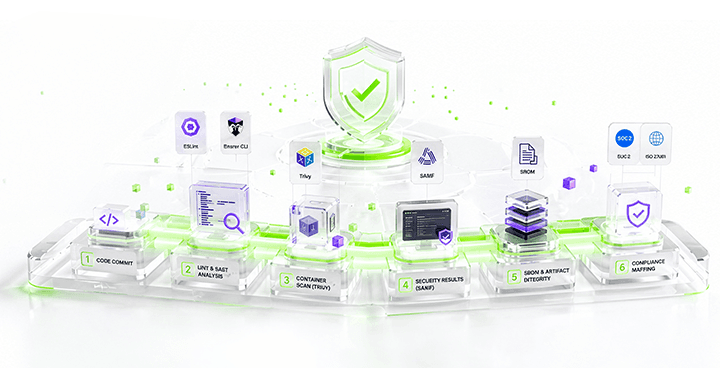
Table of contents
Executive Summary
1. Why DevSecOps Is Now a Board-Level Imperative
2. The SSAF Model: Six Steps Across the Delivery Lifecycle
3. Proof of Concept: Implementing SSAF in a GitHub Actions Pipeline
4. Continuous Compliance & Evidence
5. Conclusion
Tags:
This article is about Secure Software Development Life Cycle (SDLC) Acceleration Framework (SSAF) model for embedding continuous security into every stage of the software delivery pipeline with security checks.
Executive Summary
The average cost of a data breach reached $4.4M in 2025 (report by IBM). Yet most breaches remain exploitations of known, preventable vulnerabilities that slipped through an development pipeline. The Secure SDLC Acceleration Framework (SSAF) is a six-pillar model that makes security a first-class engineering concern measurably reducing time-to-remediation, slashing breach exposure, and compressing compliance cycles.
1. Why DevSecOps Is Now a Board-Level Imperative
Traditional DevOps Pipeline are now fails against the velocity of modern software delivery with security. With teams shipping dozens of releases per day, the window between vulnerability introduction and production exposure has collapsed from months to minutes. Organizations that treat security as an afterthought now face both breach liability and regulatory fines, a dual exposure that boards can no longer ignore.
DevSecOps is the answer: a cultural and technical model in which security is shifted left, embedded into every developer commit, every CI pipeline run, and every infrastructure provisioning event. The Secure SDLC Acceleration Framework operationalizes this philosophy into a product-ready, measurable system.
2. The SSAF Model: Six Steps Across the Delivery Lifecycle
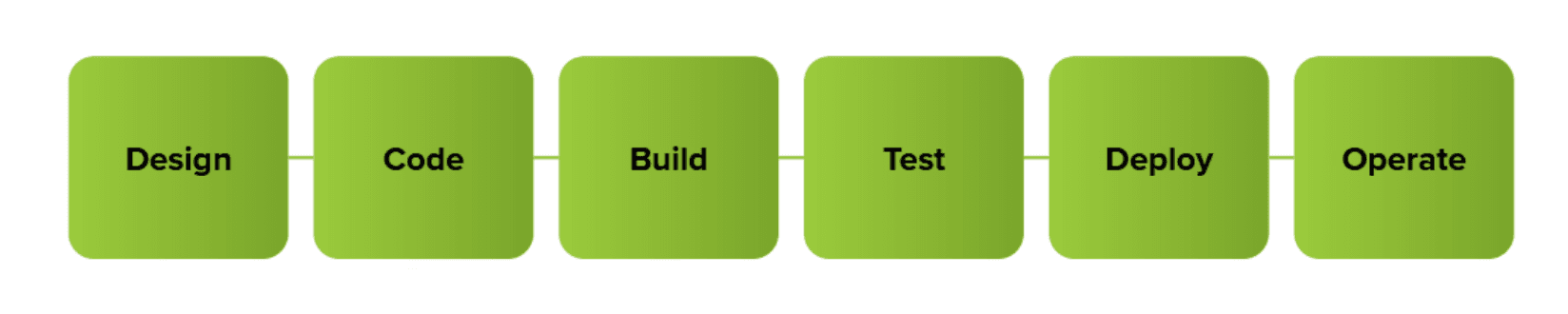
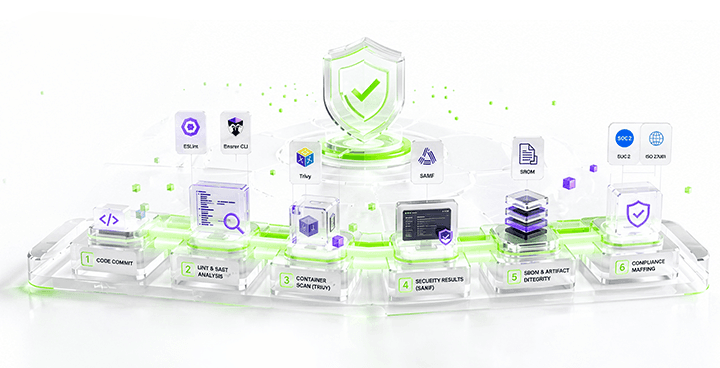
SSAF organizes security controls across the full SDLC into six interdependent steps. Each steps maps to one or more pipeline stages and produces artifacts and findings, SBOMs that feed the next stage. Together they form a continuous security feedback loop.
The steps of SSAF Model are Doing as this Graph:
| Stage | Tools / Controls |
|---|---|
Design | Threat modeling (STRIDE), secure requirements, gap assessment |
Code | SAST, secrets scanning, IDE plugins, peer review, security advisor review |
Build | SCA, SBOM generation, compliance |
Test | DAST, IAST, API security testing, Manual test by Developers, Penetration Test after automated findings. |
Deploy | IaC scanning, policy-as-code gating, artifact signing |
Operate | CVE monitoring and Ticket Monitoring |
These stages are required to create and accelerate the DevSecOps model for your development. After the SSAF implements all pipeline artifacts (SBOM, signing attestation, scan results) are stored as immutable audit evidence. This evidence will reduce the audit prep time from weeks to days in validated deployments
3. Proof of Concept: Implementing SSAF in a GitHub Actions Pipeline
3.1 First Pipeline
Before the SAST pipeline, before SBOMs, before supply chain security, and before any security enforcement there was this pipeline. A very simple CI/CD workflow whose primary purpose was
“Build the application, push the container, and deploy it successfully.”
At the time, this pipeline felt modern enough with the automated deployment, containerized delivery, GitHub Actions integration, and automatic server deployment. Honestly, for an early-stage engineering workflow, it worked.
But looking back now through a DevSecOps perspective, this pipeline also clearly shows the difference between deployment automation and secure software delivery. Here are the graph for pipeline deployment.
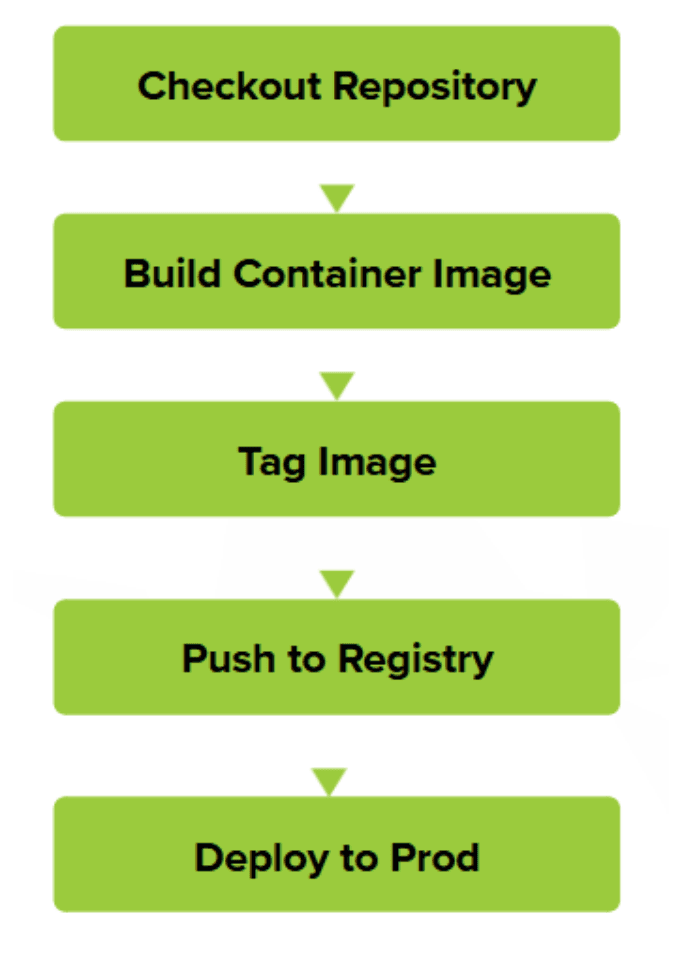
That was essentially the entire workflow. No security gates. No scanning. No artifact validation. No supply chain visibility. Let’s dive into the Code!
None
name: Create and publish API

on:
  push:
    branches: ["staging"]

env:
  IMAGE_NAME: belega-commerce-api-image
  REPOSITORY: belega-commerce-api

jobs:
  ci-cd-api-docs:
    runs-on: ubuntu-latest

    permissions:
      contents: read
      packages: write
      id-token: write

    steps:
      - name: Checkout repository
        uses: actions/checkout@v4

      - name: Build
        run: |-
          docker build -f Dockerfile
            --tag "${{ env.REPOSITORY }}/${{ env.IMAGE_NAME }}:$GITHUB_SHA" \
            --build-arg GITHUB_SHA="$GITHUB_SHA" \
            .
The application was packaged into a container image. The pipeline also attached metadata such as GITHUB_SHA. This was actually one good practice early on because it allowed traceability between source commits, Deployments, and container versions. However, the build process itself had no validation controls. At this stage there’s no security checks therefore if vulnerable code existed, the image would still be created successfully.
None
  - name: Tag Image with Latest
  run: |-
    docker tag "${{ env.REPOSITORY }}/${{ env.IMAGE_NAME }}:$GITHUB_SHA" \
    "${{ env.REPOSITORY }}/${{ env.IMAGE_NAME }}:latest"
The pipeline tagged the image with a commit SHA,and a latest tag. This allowed for a version tracking, rollback possibilities, and deployment convenience. At the time, using commit SHA tagging already felt like a mature practice. But traceability without verification is incomplete. The image could still be vulnerable or contain insecure dependencies. The pipeline just knew “which image” was deployed but it doesn’t know wether it’s safe or not.
None
  - name: Publish
  run: |-
    docker push "${{ env.REPOSITORY }}/${{ env.IMAGE_NAME }}:$GITHUB_SHA" \
    "${{ env.REPOSITORY }}/${{ env.IMAGE_NAME }}:latest"
Code above explained that the container image was then uploaded into the registry. This stage completed the artifact publication process. From a CI/CD perspective this was a successful automation but in SSAF Model this is still a blind deployment model because it accept whatever the built image was, insecure packages, or even a secrets leak.
None
  - name: Deploy to Cloud Run
    id: deploy
    uses: google-github-actions/deploy-cloudrun@v1
    with:
      service: ${{ secrets.SERVICE_NAME }}
      region: ${{ secrets.REGION }}
      image: ${{ env.REPOSITORY }}/${{ env.IMAGE_NAME }}:latest
  - name: Show Output
    run: |
      echo ${{ steps.deploy.outputs.url }}
      echo ${{ steps.deploy.image }}
Finally, the image was deployed directly into Cloud Run Servers. Once deployment succeeded, the pipeline printed deployment URL, and image information. Operationally, this was efficient but as we know this is not really safe because the previous jobs have no security checks.
3.2 SSAF Implementation (Improved Pipeline)
When I first started building a DevSecOps pipeline, my main objective was simple:
“Shift security earlier into the development lifecycle without slowing developers down too much.”
At the time, I did not yet fully understand optimization, pipeline governance, or security orchestration maturity. What I had was a working CI/CD pipeline integrated with multiple security checks that helped introduce Secure SDLC practices into the deployment flow. It is about understanding the first real-world Secure SDLC acceleration pipeline I implemented, what each stage actually did, and where the design could have been improved later. Let’s take a look at the graphs information below.
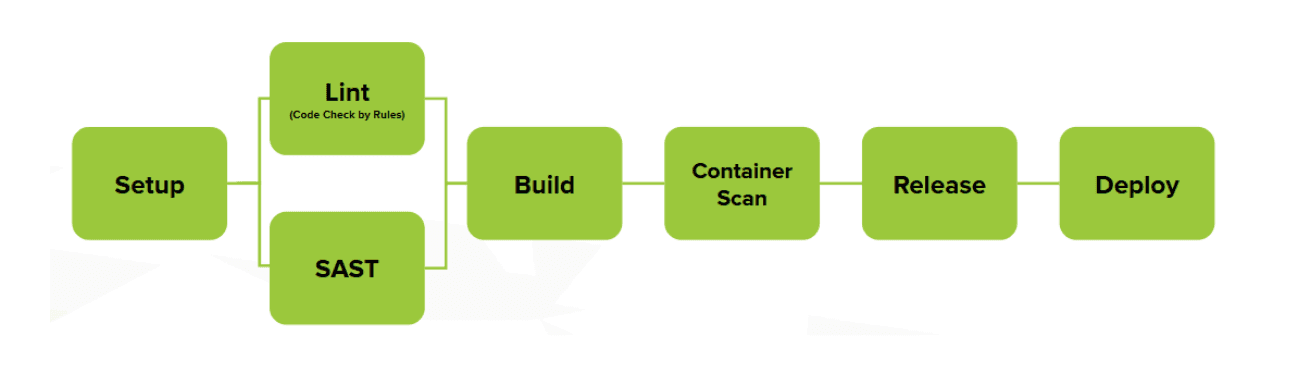
Even though this was an early implementation, the pipeline already followed a basic Secure SDLC concept:
Detect issues before deployment
Lint (Automated Code Scanning according to the rules that we’ve created)
Generate security visibility
Keep scans automated
Integrate findings into the CI/CD workflow
Let's take a review on the pipeline on necessary steps and jobs by excluding all unrelated such as authentication to the Cloud Service and other processes that more of a technical condiments to the theory of SDLC and see how the SSAF approach should be. The following code illustrates how the deployment workflow can be automated from build to release before using the SSAF method.
None
name: Deployment

on:
  push:
    branches: ["staging"]
    paths:
      - "src/**"
      - ".github/workflows/**"
The code above describe that the Deploy pipeline will performed on action push code on path src/ and .github/workflows/. Therefore the pipeline will be executed with only that condition. Let’s move on to the next line of code.
None
  setup:
    ...
  eslint:
    needs: setup
    continue-on-error: true
    runs-on: ubuntu-latest
    environment: staging
    permissions:
      contents: read
      actions: read
      security-events: write
      packages: read
    steps:
      - name: Checkout repository
        uses: actions/checkout@v4
      - name: Install ESLint
        id: install-eslint
        run: |
          npm install eslint@8.10.0
          npm install @microsoft/eslint-formatter-sarif@2.1.7

      - name: Run ESLint
        id: run-eslint
        run: npx eslint ./src
          --config eslint.config.js
          --format @microsoft/eslint-formatter-sarif
          --output-file eslint-result.sarif

      - name: Upload analysis results to GitHub
        uses: github/codeql-action/upload-sarif@v3
        id: upload-eslint-result
        if: success() || failure()
        with:
        sarif_file: eslint-result.sarif
        wait-for-processing  .
The pipeline scans the source code inside the src directory using the ESLint configuration from the repository that detects a secret and library misconfiguration. All the ESLint results using SARIF will be important because SARIF standardizes security findings and allows results to be uploaded into centralized security dashboards on GitHub.
None
jobs:
  setup:
    ...

  eslint:
    ...
  sast-bearer-cli:
    needs: eslint
    continue-on-error: true
    runs-on: ubuntu-latest
    environment: staging
    permissions:
      contents: read
      actions: read
      security-events: write
      packages: read
      id-token: write
    steps:
      - name: Checkout repository
        uses: actions/checkout@v4

      - name: Google Auth
        id: auth-sast-bearer-cli
        uses: "google-github-actions/auth@v2"
        with:
          workload_identity_provider: ${{ secrets.WIF_PROVIDER }
          service_account: ${{ secrets.CLOUD_RUN_SA }}

      - name: Run Bearer
        uses: bearer/bearer-action@v2
        id: run-bearer-scan
        with:
          format: sarif
          output: ${{ env.REPO }}-${{ env.COMMIT_SHA }}-security.sarif

      - name: Upload analysis results to GitHub
        uses: github/codeql-action/upload-sarif@v3
        id: upload-bearer-result
        if: success() || failure()
        with:
          sarif_file: ${{ env.REPO }}-${{ env.COMMIT_SHA }}-security.sarif
          wait-for-processing: tr
After linting completed, the pipeline moved into actual SAST scanning using Bearer CLI. This was the first dedicated application security scanning layer. Bearer scans the source code for issues such as:
Hardcoded secrets
Insecure patterns
Sensitive data exposure
Misconfigurations
Potential vulnerabilities in application logic
None
  build:
    needs: setup
    runs-on: ubuntu-latest
    environment: staging
    permissions:
      contents: read
      actions: read
      packages: write
      id-token: write
    steps:
      - name: Checkout repository
        uses: actions/checkout@v4
      - name: SSH to Server and Build
        id: compute-ssh-build
        ...
        command: |-
          ...
          bash ./shell/build.sh staging ${{ env.COMMIT_SHA }} ${{ env.REGISTRY}} ${{ env.IMAGE_NAME }}
      - name: Build Output
        id: compute-ssh-build-output
        run: |-
          echo '${{ steps.compute-ssh-build.outputs.stdout }}'
          echo '${{ steps.compute-ssh-build.outputs.stderr }}'
Once the earlier stages completed, the pipeline moved into the build phase. This stage focused on creating the deployable application artifact. The workflow connects to the build environment and executes bash ./shell/build.sh staging.
None

  release:
    needs: build
    runs-on: ubuntu-latest
    environment: staging
    permissions:
      contents: read
      actions: read
      packages: write
      id-token: write
      security-events: write
    steps:
      - name: Checkout repository
        ...
      - name: Google Auth
        ...

      - name: Run Trivy vulnerability scanner
        uses: aquasecurity/trivy-action@0.28.0
        with:
          image-ref: "${{ env.REGISTRY }}/${{ env.IMAGE_NAME }}:${{env.COMMIT_SHA }}"
          format: "sarif"
          output: "trivy-results.sarif"

      - name: Upload Trivy scan results to GitHub Security tab
        uses: github/codeql-action/upload-sarif@v3
        if: success() || failure()
        with:
        wait-for-processing: true
        sarif_file: "trivy-results.sarif"

      - name: Release Output
        id: compute-ssh-release-output
        run: |-
          echo '${{ steps.compute-ssh-build.outputs.stdout }}'
          echo '${{ steps.compute-ssh-build.outputs.stderr }}'
    deploy:
      ...
      - name: Deploy Output
        id: compute-ssh-deploy-output
        run: |-
          echo '${{ steps.compute-ssh-deploy.outputs.stdout }}'
          echo '${{ steps.compute-ssh-deploy.outputs.stderr }}'
This stage scanned the built container image itself. That distinction is extremely important by using Trivy. The scanner checks the container image for:
Vulnerable packages
Insecure dependencies
OS-level CVEs
Exposed libraries
Supply chain risks.
But it was important because this was the point where deployment automation started evolving into security-enabled delivery automation. The biggest achievement was not perfect detection accuracy. That mindset shift is usually the real starting point of DevSecOps maturity.
3.3 Result Implementation
After we implement the security pipeline checks. Here are the results findings on the Improved Pipeline. This Result later will be posted in the Github Security Dashboard, which is one of many alternative for Security Dashboard that we can use for managing vulnerabilities findings.
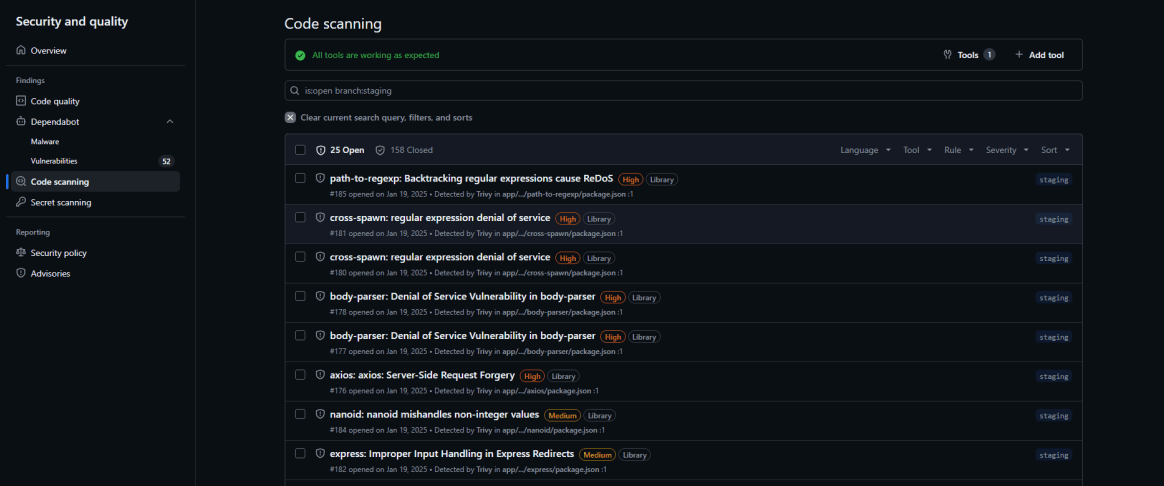
Using the traditional Pipeline we would have 0 findings because there’s no security checks, now because of the improved pipeline we managed to find a few 6 HIGH issue 11 MEDIUM issue 9 LOW issue with 158 False Positives which we closed. Let’s see the comparison result by the Before SSAF Pipeline and after the SSAF Pipeline
Let’s Compare the First CI/CD Pipeline with the SSAF Driven Pipeline according to this case of the NodeJS Application.
| Capability | Default | SSAF |
|---|---|---|
Main Objective | Automate build and deployment to Cloud Run | Introduce security checks into CI/CD workflow |
Pipeline Focus | Deployment automation | Security-integrated delivery |
Workflow Complexity | Simple linear deployment pipeline | Multi-stage security-aware pipeline |
Build Automation | Docker build and push | Docker build with security validation stages |
Automated Deployment | Direct deploy to Servers | Controlled deploy after security stages |
Static Application Security Testing (SAST) | None | ESLint + Bearer CLI (and other tools of your choice) |
Code Quality Validation | None | ESLint validation (in NodeJS) |
Security Findings Visibility | None | SARIF upload to GitHub Security tab |
Secret Detection | None | Partial detection through Bearer CLI |
Dependency Security Scanning | None | Minimal / indirect |
Container Vulnerability Scanning | None | Trivy image scanning |
Biggest Strength | Fast deployment automation | Initial shift-left security adoption |
The comparison table above gives a note that regular CI/CD Pipeline is exactly faster deployment but there’s no controlled deployment which can led to security issues in the future. The tools of choice of this Article is best for an open source tools, there’s a lot off alternatives that we can use to implement SSAF driven pipeline which ultimately choose the one suits the case.
4. Continuous Compliance & Evidence
For more advanced and compliances SSAF can be used with real-time compliance mapping to SOC 2 (Service and Organizational Control), CIS (Center of Internet Security), ISO 27001, PCI-DSS (Payment Card Industry Data Security Standard), HIPAA (Health Insurance Portability and Accountability Act), and NIS2 (Network and Information Security). Automated evidence collection for audits replaces manual, quarterly snapshots with continuous attestation with this various outcome:
Pipeline artifacts (SBOM, signing attestation, scan results) are stored as immutable audit evidence
Compliance-as-code frameworks map controls automatically
Audit prep time reduced from weeks to days in validated deployments
The journey from a blind deployment pipeline to a fully SSAF-driven, security-aware delivery system highlights the fundamental shift required for modern software development. It moves security from a periodic audit cost to a continuous, value-driving capability. The framework’s real power lies in not just detecting vulnerabilities, but in institutionalizing security as a first-class engineering concern, ensuring that speed and safety are no longer a trade-off.
5.Conclusion
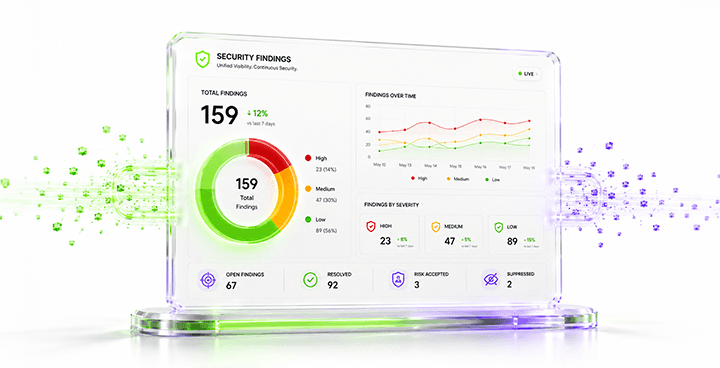
The Secure SDLC Acceleration Framework (SSAF) addresses the critical modern imperative to embed continuous security into the software delivery pipeline, moving beyond the failures of traditional DevOps pipelines that led to high data breach costs. SSAF defines security as a first-class engineering concern through a six-pillar model that spans the entire SDLC from design to operation creating a continuous security feedback loop.
The implementation demonstrates a clear shift from simple deployment automation to security-integrated delivery, utilizing tools like in this case SAST (e.g. ESLint, Bearer CLI), SCA (e.g. Trivy), and SARIF reporting to provide essential security visibility and drastically reduce vulnerabilities. This steps provides an early implementation into SSAF, we can add more like IAST (Interactive Application Security Testing), DAST (Dynamic Security Testing), SBOM (Software Bill of Materials), IaC (Infrastructure as a Code).
Ultimately, SSAF institutionalizes a DevSecOps culture, enabling real-time compliance mapping and automated evidence collection for standards like SOC 2 and ISO 27001, proving that speed and safety are complementary, not competing, objectives.
Reference
IBM Security — Cost of a Data Breach Report 2024 https://www.ibm.com/reports/data-breach
NIST — Secure Software Development Framework (SSDF) SP 800-218 https://csrc.nist.gov/publications/detail/sp/800-218/final
OWASP — DevSecOps Maturity Model (DSOMM) v5 https://owasp.org/www-project-devsecops-maturity-model/
CIS CIS Kubernetes Benchmark v1.9 https://www.cisecurity.org/benchmark/kubernetes
Sigstore / Cosign Official Documentation https://docs.sigstore.dev
MITRE ATT&CK Container Security Matrix https://attack.mitre.org
Semgrep Documentation & Rule Registry https://semgrep.dev/docs
Example Repositories Pipeline Example for comparison https://raw.githubusercontent.com/Belega-Village-UNUD/backend-api-edb/refs/heads/staging/.github/workflows/deploy.yml
Continue Reading
The Secure SDLC Acceleration Framework (SSAF)
This article is about Secure Software Development Life Cycle (SDLC) Acceleration Framework (SSAF) model for embedding continuous security into every stage of the software delivery pipeline with security checks.
Read More
AES Encryption - Unbreakable Algorithm, Breakable Systems
The Advanced Encryption Standard is a symmetric block cipher that operates on fixed 128-bit blocks of data. "Symmetric" means the same key locks and unlocks the data — unlike RSA or elliptic-curve schemes where encryption and decryption use different keys. AES accepts key lengths of 128, 192, or 256 bits, with the number of internal transformation rounds scaling accordingly: 10 rounds for AES-128, 12 for AES-192, and 14 for AES-256.
Read More
Ransomware: Understanding the Growing Threat and How to Protect Against It
Ransomware is a type of malicious software designed to block access to a computer system until a sum of money is paid. As cybercriminals continue to evolve their tactics, understanding the nature of ransomware and implementing effective prevention strategies is crucial for organizations.
Read More

Alert Fatigue: The Silent Threat That Turns Critical Warnings into Background Noise
In the world of cybersecurity, alerts are meant to be the first line of defense against potential threats. However, the sheer volume of alerts that security teams receive can lead to a phenomenon known as alert fatigue, where analysts become desensitized to warnings and may miss genuine threats.
Read More

Security Awareness Training: Building a Culture of Cyber Resilience
Employees are often the weakest link in an organization's security system because they may forget important information and are vulnerable to fraud. Security awareness training helps employees understand the risks, threats, and vulnerabilities that can be targeted. This training teaches them how to protect the organization's network and data, especially for organizations operating in the IT sector, where employees who use devices are often the target of cyber attacks.
Read More

State of the Art: Architecture, Training, and Engineering of Large Language Models
The foundational pillar of modern Large Language Models (LLMs) rests upon the Transformer architecture, a computational paradigm that fundamentally altered natural language processing through the Self-Attention mechanism. Unlike recurrent networks that process data sequentially, Self-Attention allows every token within an input sequence to interact with all other tokens simultaneously. This generates a highly contextualized representation space capable of capturing long-range dependencies without rigid structural boundaries.
Read More


© 2025 Tjakrabirawa Teknologi Indonesia. All Rights Reserved.